Browse categories
Explore
Fiverr Pro
English
$
USD
Expert in PDF Conversion, Professional Editable Forms
Level 1
Has met certain performance criteria and shows strong potential in the marketplace.
Need a professional, easy-to-use fillable PDF form for your business, school, or organization?
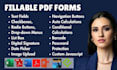
I specialize in creating clean, interactive, and mobile-friendly fillable PDF forms using Adobe Acrobat Pro. Whether you need a simple form from Word/Excel or a fully automated interactive document with advanced features, I can deliver fast, high-quality results.
From text fields, checkboxes, and dropdown menus, to digital signatures, auto-calculations, and conditional logic, your form will be tailored to your exact needs and fully compatible across devices.
My services include:
I've worked with HR teams, schools, businesses, and government departments and I always prioritize clarity, professionalism, and fast turnaround.
Whether you're digitizing a form or need one built from scratch, I'm here to help.
Ready to get started? Feel free to send a message I respond quickly and can guide you through.
_enmu66.jpg)
Convert from:
DOC, DOCX
Convert to:
What do you need from me to get started?
I’ll need your document (Word, Excel, scanned, or image), clear field instructions (if any), and your logo (optional). If you're unsure, just send what you have — I’ll guide you through the rest.
Can you convert scanned or handwritten documents to fillable PDFs?
Yes, I can. I use professional tools to recreate your scanned forms as editable, interactive PDF forms that look clean and accurate.
Will the fillable PDF form work on mobile phones and tablets?
Absolutely. All forms are optimized to work smoothly across desktop, tablet, and mobile. I recommend using Adobe Acrobat Reader for the best experience.
Can you include advanced features like auto-calculation and dropdowns?
Yes! I can include auto-calculation fields, dropdown menus, radio buttons, validation rules, and even conditional logic depending on your needs.
Do you offer custom-designed forms, not just basic conversions?
Yes, I can design professional-looking forms from scratch or rebrand existing documents to match your style and layout preferences.
Can you make the form secure or password-protected?
Yes. If requested, I can apply password protection and limit editing access for added security.
What if I need changes after delivery?
I offer revisions based on the package selected. I’ll work with you to ensure the final form meets your expectations.