Browse categories
Explore
Fiverr Pro
English
$
USD


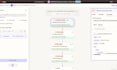
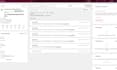
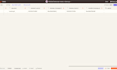

I will build a Zapier invoice follow-up automation that helps you follow up on unpaid invoices without checking payment status manually.
This Gig is a good fit if you create invoices in Stripe, QuickBooks, Xero, or a similar tool and want a structured workflow for reminders, payment checks, CRM updates, logs, and internal alerts.
Depending on the package, I can set up:
Typical flow:
New payment request - wait until reminder time - check live payment status - send reminder only if unpaid - update CRM/logs - notify team - stop or sync when paid.
Scope is limited by package: invoice sources, reminder steps, Zap steps, app actions, logging depth, paid sync, and test scenarios.
Please message me before ordering if you need multiple invoice sources, custom payment logic, complex CRM stages, or more Zap steps than the package includes.
Zapier Workflow Automation Specialist
Languages
Can you use tools other than Stripe, HubSpot, Gmail, Slack, or Tables?
Yes. Those apps are used in the demo case, but I can usually adapt the workflow to equivalent tools in your current process, depending on your stack and the automation scope.
Do I need my own Zapier account?
Yes. For implementation and launch, the client should provide access to their own Zapier workspace/account so the automation remains under their ownership and can be managed after delivery.
Do I need to message you before ordering?
Yes, please message me first if you need multiple invoice sources, complex CRM stages, custom payment logic, or more steps than the package includes.
What counts as one invoice source?
One invoice source means one app or system that creates invoices, such as Stripe only, QuickBooks only, or Xero only.
What counts as one reminder step?
One reminder step means one scheduled follow-up point, including timing logic, status check, and the related follow-up action.
Is payment paid sync included?
Payment paid sync is included in Premium. It can update logs, CRM stages, or internal notifications after the invoice is paid.
Can you update my CRM deal stages?
Yes, if CRM actions are included in your package and your CRM is supported by Zapier or has API/webhook access.
What do you need from me to start?
I need your invoice source, reminder timing, email templates, CRM stage rules, log fields, notification channel, and access to the required apps.
Do you test the workflow before delivery?
Yes. Each package includes test scenarios based on its scope, including reminder logic, status checks, and included app actions.
Can I add more steps or reminders later?
Yes. You can add extra reminder steps, extra invoice sources, or extra Zap steps through Gig extras or a custom offer.


