Browse categories
English
$
USD
Connect to your AI




Stop typing every receipt into a spreadsheet.
Send clear receipt photos or PDFs and get the date, supplier, tax and total recorded, with files easy to find and duplicates flagged.
BASIC: I turn up to 30 one-page receipts into a ready-to-use Excel file. This is a one-off job; no software is installed.
STANDARD: Put a receipt in your Google Drive folder. The automation reads it, adds its details and file link to Google Sheets, and files the original neatly.
PREMIUM: Also collect receipts from Gmail, suggest your expense categories, send email alerts and show a spending summary.
I include checks and a list of items for you to review. Setup covers up to 10 details per receipt and one spreadsheet. Clear printed one-page documents are included; handwriting and item-by-item lists need a separate quote.
Automation setup is a one-time price. You pay any tool, AI or hosting costs in your own accounts. Send samples before ordering so we can confirm the scope.
I have built receipt-filing and expense-recording tools in business operations, including GSPC.
Spanish Localization, Subtitle QA and Business Automation
Languages
What is the difference between Basic and the automation packages?
Basic is a one-off job: up to 30 printed, one-page documents become an Excel file. No automation is installed. Standard and Premium set up a workflow you can keep using in your own accounts.
Can you read photos and scanned receipts?
Yes, if the readable printed samples work with OCR. Send examples of each file type and language first. All packages cover one-page documents and header fields only. Handwriting, itemized lines and multipage documents need a separate quote. Unclear details go to review.
What does Standard include?
One Drive folder to one Sheets register, using Drive, Sheets and one OCR/AI service. Up to 12 workflow modules, 10 header fields plus audit data, file links, filing rules and a review queue. I test 20 one-page documents; that is not a usage limit.
What does Premium add?
Drive and Gmail intake, your expense categories, an email alert and a summary tab. It connects 4 services: Drive, Gmail, Sheets and one OCR/AI provider. Up to 20 modules, 10 header fields plus audit data and 50 one-page test documents. Both inputs feed one register.
Are subscriptions and running costs included?
No. You own and pay for the accounts, OCR/AI use and Make or n8n plan/hosting. The automator is the engine, not another connected business service. We agree the tools and budget first. Any paid processing for Basic also needs your approval.
Is the connection one way or two way?
One way: files or email feed your register and archive. Editing a row does not update receipts or Gmail. Dropbox, Excel Online, ERP, payment approvals, two-way sync, extra apps or more destinations need a separate quote.
What happens to duplicates or unclear amounts?
We agree duplicate rules and keep a review list. Uncertain amounts or suggested categories are flagged rather than silently approved. Tax amounts are copied as shown; I do not decide tax rates, deductibility or document authenticity.
Can I use the automation after the test documents are processed?
Yes. The 20/50 documents are the acceptance test set, not a monthly allowance. Further use depends on your tools, quotas, hosting and the agreed input types staying the same. Monitoring, new document types and ongoing support are separate.
What do revisions and handover cover?
Basic and Standard include 1 revision; Premium includes 2. They cover corrections within the agreed files or setup. New apps, fields or features are separate. Automation packages include instructions; Premium also includes a short video.
Does your portfolio show this cloud automation working?
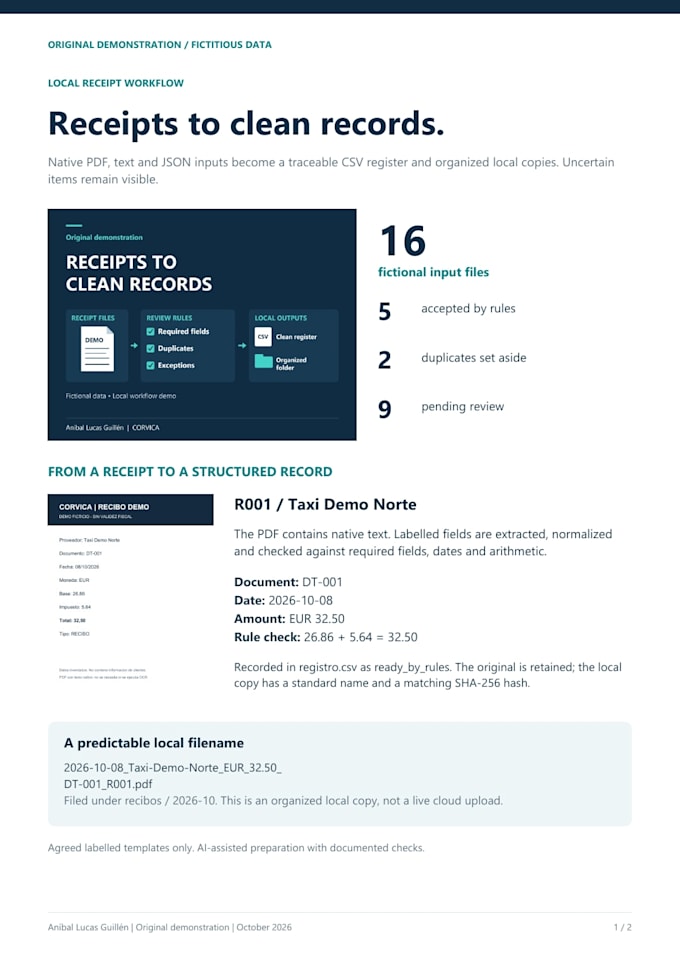
The current portfolio is a separate fictional local demo: native PDF/text/JSON to CSV, organized files and review logs. It does not show OCR, a live cloud connection or an XLSX output. Those are proposed service deliverables, tested on the agreed order.