Browse categories
English
$
USD
Connect to your AI
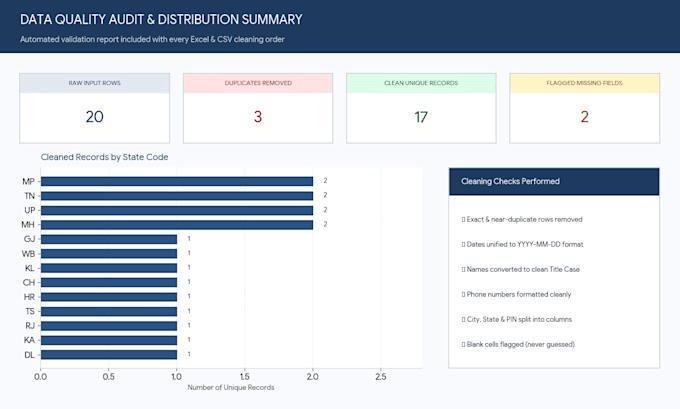
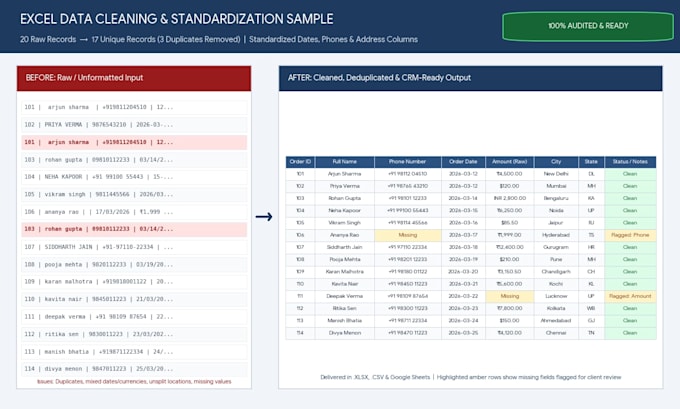
Tired of messy spreadsheets, duplicate records, or hours of manual typing? Let me turn your raw data into a clean, ready-to-use Excel or CSV file.
With hands-on experience in SQL, Microsoft Excel, and Google Sheets, I don't just copy and pasteI verify, structure, and audit your data so it imports smoothly into your CRM, accounting software, or database without errors.
My Services Include:

Q1: Is my business data kept confidential?
Yes, 100%. I treat all client spreadsheets, invoices, and contact lists with strict confidentiality. Your files are never shared with third parties and are permanently deleted from my system once you approve the completed order.
Q2: What file formats can you deliver?
A: I deliver clean Microsoft Excel (.xlsx), UTF-8 .csv, and shareable Google Sheets links—formatted to match your exact CRM or database import template.
Q3: Can you handle files with more than 5,000 rows?
A: Yes! Using Excel formulas and SQL processing, I can clean and standardize large datasets of 10,000+ rows quickly. Send me a quick message with your file size, and I will send you a custom offer within minutes.
Q4: What if my PDFs are scanned or non-editable?
A: I handle both digital and scanned PDFs. After extracting the text, I manually verify every column and cross-check row totals using SUM formulas so there are zero optical recognition typos.