Browse categories
Explore
Fiverr Pro
English
$
USD
15+ years of work experience in Information Technology. Adept with the level of experience in provisioning and implementation of Microsoft environments. Extensive experience in setting up Azure, Exchange, Security, Compliance, Teams, OneDrive, SharePoint. Able to offer extensive knowledge in project coordination, User security controls and administration.
Services offered, but not limited to:
BACKUPS & MIGRATION
Implement & Migration to Microsoft Azure & Microsoft 365 services
AZURE
Configuration and Administration Microsoft Azure & Microsoft 365 services
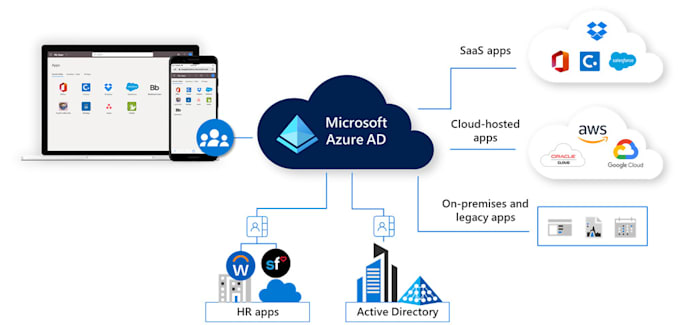
Azure AD, Hybrid Azure AD Join
Microsoft Endpoint Manager / Intune Services
SECURITY & COMPLIANCE
Configuring compliance policies
Risk and Data governance
PRODUCT SUPPORT
Outlook
OneDrive
Team
SharePoint
Power Automate
Plus more!
**PLEASE MESSAGE ME BEFORE ORDERING**


Device:
Desktop
•
Laptop
•
Server
•
Mobile
•
Tablet
Operating system:
Windows
•
Linux
•
IOS
•
Android
•
OSX
What is Office 365?
Office365 is a bundle of software that (for most packages) provides Word, Excel, PowerPoint, Outlook and more on the desktop through a local install plus OneDrive cloud storage and a hosted Exchange mail server.
What is Windows 365?
Windows 365 is a Windows 10 for the desktop subscription. Note that Windows 365 is not a real thing. Microsoft has decided to call its Windows subscription model “Windows E1″ Windows E3” and Windows “E5”, but we find that very confusing so we promote it as Windows 365 which makes more sense to our
What is Microsoft 365?
Microsoft 365 is Office 365 + Windows 365 which means you are buying a subscription to Microsoft Office (Word, Excel, PowerPoint…) and a subscription to Windows 10.
What is the difference between Office 2021 (one-time purchase) and Microsoft 365 (subscription)?
Office 2021 is sold as a one-time purchase, which means you pay a single, up-front cost to get Office apps for one computer. One-time purchases are available for both PCs and Macs. However, there are no upgrade options, which means if you plan to upgrade to the next major release, you'll have to buy
How do I know if my PC or Mac can run Microsoft 365?
Microsoft 365 is compatible with PC, Mac, Android, and iOS.
Will Microsoft 365 be identical on a PC and a Mac?
No. Apps are tailored to work best on each operating system. The apps available for Mac users and the specific features included may be different from those available for PC users. With Microsoft 365, you can be flexible. With your account, you are not limited to exclusively Mac or exclusively PC, s
Do I keep control of my documents with a Microsoft 365 subscription?
Yes. Documents that you have created belong fully to you. You can choose to store them online on OneDrive or locally on your PC or Mac.
Is Internet access required for Microsoft 365?
Internet access is required to install and activate all the latest releases of apps and services included in all Microsoft 365 subscription plans. Note that if you are an existing subscriber, you do not need to reinstall or purchase another subscription. For Microsoft 365 plans, Internet access is
How much OneDrive storage do I get with Microsoft 365?
Customers with an active Microsoft 365 Personal subscription receive an additional 1 TB of OneDrive storage per subscription plus 5 GB of storage for free. Customers with an active Microsoft 365 Family subscription receive an additional 1 TB of OneDrive storage per user, for up to 6 users, plus 5 GB
Are my documents stored in OneDrive also available offline?
Yes. If you’re using Windows 8.1 or Windows 10, OneDrive is preinstalled. To access your documents when you’re not connected to the Internet, open File Explorer on your PC and go to the OneDrive folder. When you reconnect, OneDrive updates the online versions with changes you made offline.