Browse categories
English
$
USD
Connect to your AI

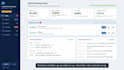
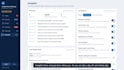
Boss, crew and office manager. When you're all three, things slip.
A quote you forgot. An invoice nobody chased. A customer who asked about booking and never heard back.
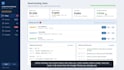
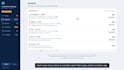
I pull the Google Sheets you already use into one live dashboard:
Follow-ups are written for you. Payment reminders, quote nudges and lead replies wait for one tap of approval. Nothing goes out without your OK, unless you switch on autopilot.
How it works:
Why me: 10+ years leading operations teams and the dashboards and automations they ran on every day.
No new software, no passwords needed. Your sheets stay yours. Optional monthly Dashboard Care is available after delivery.
Message me before ordering and tell me what you do. I'll tell you honestly which package fits.
Operations Systems and Automation for Small Businesses
Languages
How is this different from Looker Studio or a template?
Templates show what they were built to show. I start from how your operation runs and build in your rules, owners, exceptions and calculations: the details that turn data into decisions.
My info is spread across a bunch of sheets. Is that OK?
Yes, that's where most projects start. Control includes a light tidy-up and Command a full one. If something important was never tracked, I'll set up that tracking first.
Where can the data come from?
Google Sheets, Excel, Google Forms, Gmail, Google Calendar, or exports from tools like QuickBooks, Square, Shopify or Jobber. If it can become a spreadsheet, it can feed your dashboard.
Can my team update data in the dashboard?
Yes. Update screens (mark done, add an item, change status) keep your sheets accurate without anyone editing cells by hand. Included in Control and Command.
Do I need to pay for any software?
No. It runs on Google Sheets and Google Apps Script in your own Google account. Free Gmail or Google Workspace both work. Monthly Dashboard Care is optional, only if you want ongoing changes.
Who can see the dashboard?
You decide: just you, your team, or anyone in your Google Workspace. It's a private link, not a public website.
Will you need my password?
No. You share your Google Sheets with me as Editor. I build the dashboard and hand it over in your own account. You approve Google's permission screen once.
Does it update automatically?
Yes. It reads live from your sheets every time it opens. Imports and summary emails run on a schedule.