Browse categories
English
$
USD
Connect to your AI
Remote IT support for small businesses
An untested backup is a hope, not a backup. Ask anyone who has paid for a recovery.
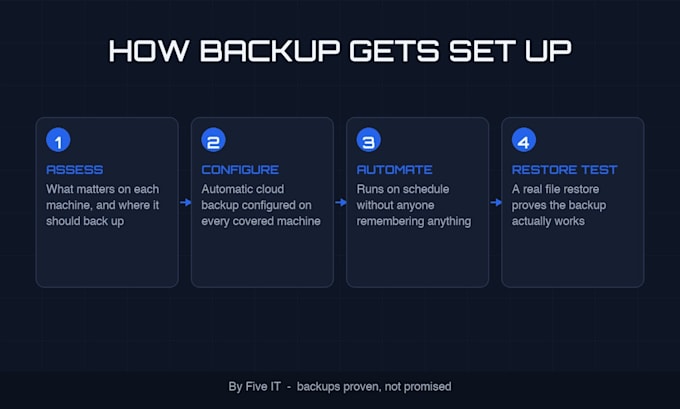
I set up automatic cloud backups on your business computers, then prove they work with a real restore. Not a screenshot of a green checkmark. An actual file, deleted and recovered in front of you, so you have seen it work with your own data.
The tiers:
Storage is in YOUR account, under your name. I configure it; I do not hold your data or your passwords. If we ever stop working together, the backups stay yours.
I also check the two things most backup setups get wrong: whether the backup actually covers your working files, and whether it keeps running when nobody is looking.
Have a NAS, an old drive nobody trusts, or a machine that cannot leave the premises? Message me first. I would rather scope it right.




Software type:
Other
Where does my data go?
Into a cloud storage account in your name (I recommend options at setup based on your needs and budget). I configure it; I never hold copies of your business data.
What is a restore test and why does it matter?
I delete a test file from a covered machine and recover it from the backup, in front of you. It is the only proof a backup works. Silent failures are common and invisible until the day you need the data.
Will backups slow my computer down?
Scheduled to run outside working hours, throttled so it does not fight your work for bandwidth. Most people never notice it running.
Does this protect against ransomware?
It is the recovery half of ransomware protection. Versioned cloud backups mean an encrypted file can be replaced with a clean copy. I also check that backup files themselves are not writable by normal users, which is what stops ransomware from encrypting your backups too.
What do you need to start?
Remote access to the covered machines at a time you choose, and which folders matter most to you. A short list is fine.
What if I want to stop after setup?
The backups are in your account and keep running. You get the documentation page that explains the whole setup, so any future technician can pick it up cold.