Browse categories
English
$
USD
Connect to your AI
PDF to Excel for statements and invoices, every total checked
A folder of invoices, receipts or purchase orders, entered into one clean spreadsheet. Every line and every grand total is checked against the document before you get it.
What I enter:
What you get:
How it's checked:
Every delivery includes a verification summary: documents covered, totals matched, anything flagged. Your files are used only for your order and deleted after delivery on request.
Big backlog or lots of vendors? Send a few samples and I'll quote it.

Type:
Convert data
Tool:
Excel
•
Google Sheets
How do you make sure the totals are right?
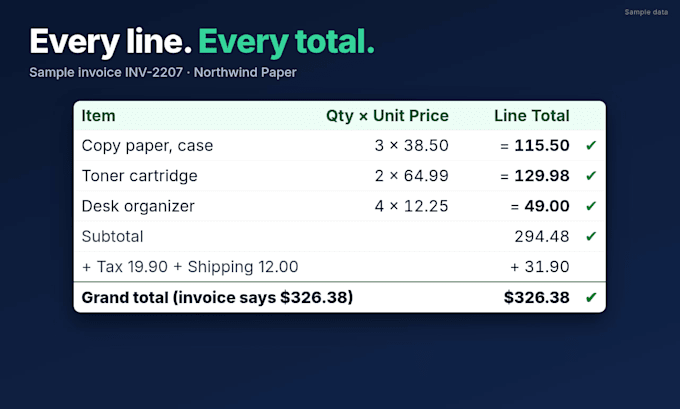
Each line is checked (qty x unit price = line total), then lines plus tax, shipping and discounts must equal the grand total. Then it's hand-checked. The verification summary shows documents covered, totals matched and items flagged.
What if an invoice's own math is wrong?
I enter exactly what the document says and flag the mismatch in the summary, with the amount it's off by, so you can take it up with the vendor. Nothing is changed to force a match.
Line items or one row per document?
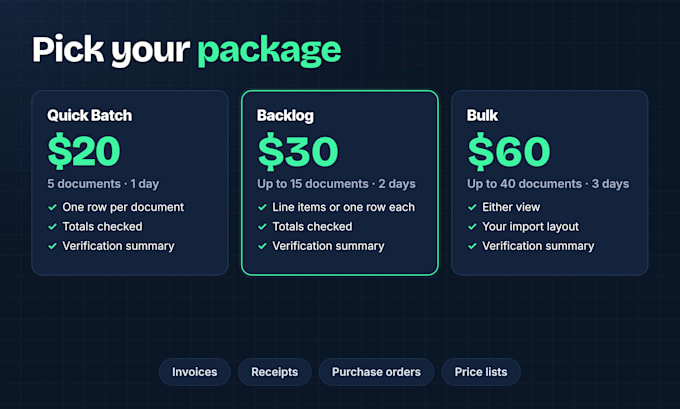
Quick Batch delivers one row per document. Backlog and Bulk give you the choice: full line-item detail for inventory and cost analysis, or one row per document for expense tracking.
How are documents counted?
Each invoice, receipt or purchase order counts as one document, up to 3 pages long. For vendor price lists, every 2 pages count as one document. Not sure how yours count? Send me a sample before you order.
Can you match my accounting or inventory import?
Yes, in Bulk. Share your template or column list and I'll match the columns, date format and order so it imports cleanly.
What file types do you accept?
Digital PDFs: the invoices and receipts vendors email you or your software exports. For password-protected PDFs, send an unlocked copy or share the password in Fiverr chat. Unreadable values are marked [illegible], never guessed.
Can you do paper receipts, scans or phone photos?
Not as a standard order. My totals checks are built around digital PDFs, where every number can be read exactly. If you're not sure what you have, send me one or two samples and I'll tell you before you order.
Can you handle multiple currencies?
Yes. Each amount stays in its original currency with a currency column, so totals still match the documents. No exchange-rate conversion is applied.
What if I have more than 40 documents?
Add Extra 10 documents for $15 each, or send a sample and a rough count and I'll send a custom offer with a firm delivery date.