Browse categories
Explore
Fiverr Pro
English
$
USD

Level 2
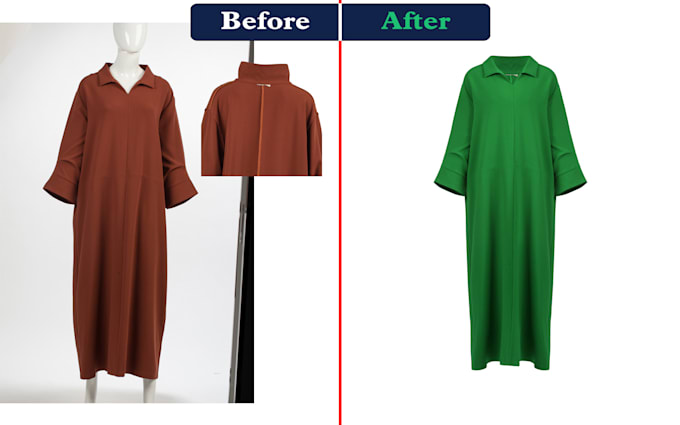

Welcome to my gig!
Are you looking for Photo Color Correction or Replacement services?
This is the right place.
Color Correction or Color Replacement: This is one of the most crucial services in Photoshop. If you've shot a single photo but want to showcase it in various colors, feel free to contact me. I'll work my magic!
Let's Transform Your Photos! Please send me your images, and let's create magic together. Whether it's product shots, portraits, or event photos, I'll make them shine. Click that Order Now button, and let's get started!
Please inform the freelancer of any preferences or concerns regarding the use of AI tools in the completion and/or delivery of your order.
Professional Image Editing, Rhinestone Design, Vector Tracing
Level 2
Languages
What is Color Correction in Photoshop?
Color correction in Photoshop is the process of altering and enhancing the colors of an image to achieve a desired look or to correct any imperfections. It’s a vital step in the post-production workflow, ensuring that your pictures appear visually appealing and accurate to life
What Are the Basics of Color Correction?
Understanding the basics is crucial: Color Modes: Photoshop offers two primary color modes—RGB (Red, Green, Blue) for digital displays and CMYK (Cyan, Magenta, Yellow, Black) mainly for print. Choosing the correct mode is essential for maintaining color accuracy. Histogram Analysis: Reading and unde
What Techniques Can I Use for Color Correction or Color Replacement?
Levels Adjustment: This powerful tool allows precise control over brightness, contrast, and tonal range. Adjust sliders to reveal hidden details. Curves Adjustment: Similar to Levels but with even more control. S-curves can add depth and richness to your photos. Color Balance: Modify colors in your
Is There a Color Replacement Adjustment Layer in Photoshop?
Yes, there is! You can find it under “Image” > “Adjustment” > “Replace Color.” You can even save the change recipe as an *.ATX file and load it for new images. This is useful when replacing colors with sharp borders in the image
How Can I Use Color Cards for Color Correction?
Color cards (such as those made by Tiffen) are used in labs to achieve an exact match with a print. By holding up a card to a test print and adjusting from there, you can fine-tune color correction. Look up tutorials using Curves for more guidance
