Browse categories
Explore
Fiverr Pro
English
$
USD
Excel VBA Developer and HR Automation Expert
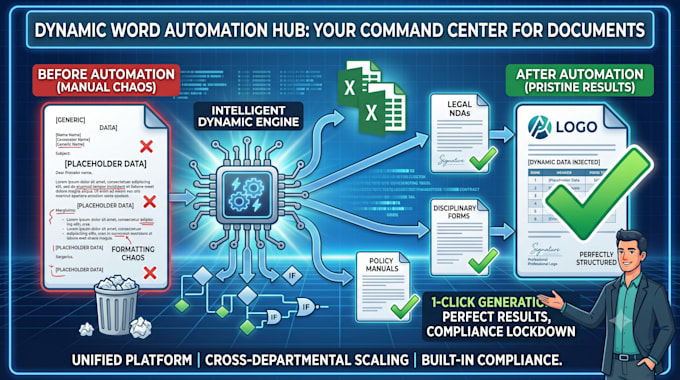
Are your managers wasting hours copy-pasting employee data into standard templates, risking compliance errors and broken formatting?
I engineer bulletproof, automated MS Word templates powered by advanced mail merge logic, turning raw data into pristine corporate documents instantly.
What I Deliver:
With eight years of hands-on experience structuring corporate recruitment and operational workflows, I don't just format documents; I understand the internal logic of Human Resources administration.
Send me your current templates and raw Excel data, and I will deliver a 1-click administrative pipeline.
Language:
English
Purpose:
Business
Work model:
Project-based
Service type:
Template creation
•
Formatting
•
Content arrangement
File type:
Word
What kind of documents can you automate?
I specialize in corporate operational workflows: employee lifecycle kits (offer letters, contracts), disciplinary forms, requisition memos, and bulk training certificates.
Will I be able to edit the Word documents after you deliver them?
Yes. The underlying logic and formatting restrictions are embedded, but the output documents remain fully editable MS Word files for any final manual adjustments.
What does "complex logic branching" actually mean for my files?
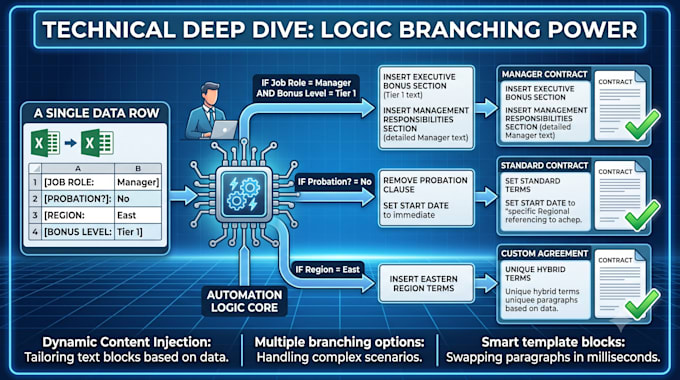
It means your document writes itself. If an employee in your Excel sheet is marked as "Executive," the mail merge will automatically insert the executive bonus clause into their contract while hiding it from standard employee outputs.
How should I prepare my Excel data before sending it to you?
Ensure your columns have clear headers (e.g., "First Name", "Start Date") and each row represents one complete record. I can apply strict data validation rules to your spreadsheet via the Gig Extra if you need help cleaning and locking down the inputs.