Browse categories
Explore
Fiverr Pro
English
$
USD
Linux, Cloud Infrastructure and WHMCS Integration Specialist
Is your cPanel/WHM server properly secured against brute-force attacks, exposed services, spam abuse, malware, and unsafe configurations?
I provide professional security auditing and hardening for cPanel/WHM servers running on VPS, dedicated servers, and cloud infrastructure. With more than 20 years of IT infrastructure experience, I focus on practical security improvements without unnecessarily disrupting production services.
My services may include:
Please contact me before ordering. Share your operating system, cPanel/WHM version, number of hosting accounts, current security tools, known issues, and expected outcome.


Server:
Other
Operating system:
Linux
•
Unix
•
Other
Should I contact you before ordering?
Yes. Please contact me before ordering so I can review your server environment, number of cPanel accounts, current security tools, known issues, and required scope. Compromised or multi-server environments may require a custom offer.
What is included in cPanel/WHM server hardening?
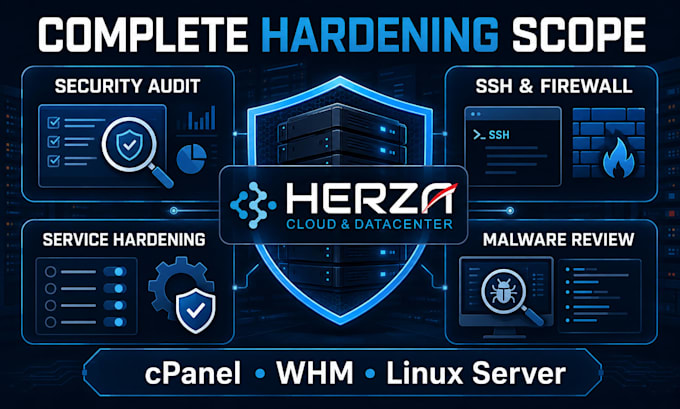
Depending on the selected package, hardening may include SSH security, firewall configuration, open-port review, cPanel security settings, brute-force protection, updates, user permissions, web and PHP security, ModSecurity review, malware scanning, and post-change verification.
Do you guarantee that my server will never be hacked?
No security professional can guarantee that a server will never be compromised. Hardening reduces known risks and improves the server’s security posture, but ongoing updates, monitoring, secure applications, strong credentials, and reliable backups remain essential.
Is malware removal included?
Malware scanning and reporting may be included in the Premium package. Extensive malware removal, website repair, backdoor investigation, account-by-account cleanup, or compromised-server recovery requires a separate assessment and custom offer.
Do I need a backup before hardening?
Yes. A current server backup or snapshot is strongly recommended before configuration changes are applied. If no backup is available, I will explain the risks and may limit changes until a suitable recovery option is prepared.
Will there be any downtime?
Many security changes can be applied without downtime, but service restarts or firewall changes may temporarily affect access. Any potentially disruptive work should be performed during an agreed maintenance window.
Are CSF, ModSecurity, Imunify360, or other licenses included?
Configuration of available tools may be included according to the package. Commercial licenses for cPanel, Imunify360, CloudLinux, LiteSpeed, antivirus products, or other third-party software are not included and must be provided or purchased by the buyer.
How many servers and cPanel accounts are included?
Each package covers one cPanel/WHM server. Security review may cover the server configuration, but detailed malware investigation or cleanup across multiple cPanel accounts is not unlimited and will be quoted according to the number of affected accounts and websites.
Can you secure an already compromised server?
Yes, but a compromised server requires investigation before the scope can be confirmed. Depending on the damage, recovery may involve malware removal, credential rotation, website restoration, service reinstallation, or rebuilding the server from a known-clean environment.
What access will you need?
Temporary root or sudo SSH access and WHM administrator access are normally required. Hosting-provider or DNS access may also be needed in some cases. Credentials should only be provided after the order begins and should be changed or revoked after completion.