Browse categories
Explore
Fiverr Pro
English
$
USD
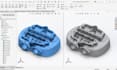
Hello, struggling with a broken STL file that won't slice, a messy 3D scan full of noise and holes, or a physical part you need turned into an editable CAD model but don't know where to start? I repair broken meshes, clean up 3D scans, and reverse engineer scan data into precise, editable CAD models, so your file actually works the way you need it to.
I handle the full range of file-repair and reverse engineering needs: fixing non-manifold edges and holes in STL files, cleaning up noisy 3D scans through full retopology, and converting raw scan data or existing STL/OBJ files into clean, parametric CAD models in STEP format using Geomagic Design X and SolidWorks. Whether you have a failed print file, a scanned part that needs to become an editable design, or a discontinued part you need to recreate from scratch, I deliver a file that's accurate and ready for your next step.
What I Offer:
Please inform the freelancer of any preferences or concerns regarding the use of AI tools in the completion and/or delivery of your order.
3d sculptor, 3d modeler 3d blender expert, 3d zbrush expert
Languages
Q: What's the difference between STL repair and reverse engineering?
A: STL repair fixes an existing broken mesh file so it prints correctly. Reverse engineering converts a scan or mesh into a fully editable CAD model with accurate dimensions, which is a more advanced service used when you need to modify the design later.
Q: What software do you use?
A: I use Geomagic Design X for reverse engineering and SolidWorks for CAD modeling, alongside standard mesh repair tools for STL fixes.
Q: Can you convert my STL file to an editable STEP file?
A: Yes, that's exactly what the Premium package is built for, turning a static mesh into a fully editable, parametric CAD model.
Q: My file has holes and floating geometry, can you fix that?
A: Yes, non-manifold edges, holes, and broken mesh geometry are fixed as part of the Basic package.
Q: Do you test the file before delivery to confirm it works?
A: Yes, every file is checked for watertight geometry and format compatibility before I send it back to you.
Q: What do you need from me before starting?
A: Please send your file along with what you need it for (3D printing, CNC, manufacturing, or editing), this helps me choose the correct approach from the start.
Q: How many revisions do I get?
A: 2 on Basic, 3 on Standard, and unlimited on Premium until your file is confirmed accurate and working.


