Browse categories
Explore
Fiverr Pro
English
$
USD

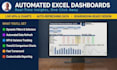
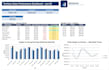

I build Excel dashboards that work the moment you open them clear, self-explanatory, and ready to hand to anyone in your team, without someone needing to explain what's what.
What I deliver:
A live Excel dashboard using the right formulas for your data not a static mockup
Conditional formatting that flags what needs attention (e.g. red/amber/green against targets)
Dynamic titles so the report is clear on screen or printed
Dropdown-based navigation for easy filtering (Standard/Premium)
Automation for adding new data periods (Premium)
With 25+ years in data analysis and reporting automation, I build for reliability one reporting system I built for a previous employer ran maintenance-free for 8 years.
Before you order, please message me with:
A brief outline of what you want the dashboard to show and who'll be using it
Your source data, or a sample of it, so I can confirm it's a good fit and scope the right package
The file format your data is currently in (Excel, CSV, etc.)
Happy to answer questions before you commit better we scope it right upfront than guess.
Excel Dashboards, Automation, Data Cleaning Specialist
Languages
What format will I receive the dashboard in?
A standard Excel file (.xlsx). If your data is in another format (CSV, Google Sheets, etc.), let me know and I can advise on the best way to bring it in.
Will this work in Google Sheets, or only Excel?
This service is built specifically for Excel. Some features (like certain formulas or conditional formatting) may not convert cleanly to Google Sheets — message me first if Sheets compatibility is important to you.
I don't have my data ready yet — can I still order?
It's best to message me first so we can confirm scope before you order. I can also work from a sample or mock-up of your data structure if the real data isn't ready.
Will the dashboard still work if my data changes each month?
Yes — the dashboards are built to update automatically as you add new data, not just work once. The Premium package includes a simple process for adding new periods going forward.
Do you use macros/VBA?
Only where it genuinely adds value, and I'll always tell you upfront if a file uses macros, since some workplaces restrict them for security reasons. Most dashboards are built using formulas alone, with no macro security prompts for your team to deal with.
How many revisions are included?
This varies by package (see the package details above) — extra revisions can also be added if needed.


