Browse categories
Explore
Fiverr Pro
English
$
USD


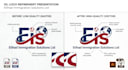

Have an AI-generated logo that looks great but isn't ready for professional use?
AI tools often create logo with alignment issues, inconsistent curves, pixelated edges, and non-editable elements.
I will professionally recreate and refine your AI-generated logo into a clean, scalable, and fully editable vector design.
What I Will Do:
Files Included:
Perfect For:
Midjourney
ChatGPT Generated
AI Logo Concepts
Low Resolution Logo Files
Turn your AI-generated concept into a professional logo ready for websites, branding, social media, and print.
Click 'Order Now' or send your AI image to get started instantly!
Please inform the freelancer of any preferences or concerns regarding the use of AI tools in the completion and/or delivery of your order.
Graphic Designer
Languages
1. What do you need from me to get started?
Just send me your AI-generated image (JPG or PNG) and let me know the correct spelling of your brand name and any specific color changes you want.
2. Will the final vector look exactly like my AI image?
Yes! It will look exactly like your concept, but better. I will fix the messy edges, perfect the symmetry, and replace any weird AI text with clean, professional fonts.
3. Why do I need a vector file?
AI tools only give you flat images (JPG/PNG). If you try to print them or make them larger, they blur and pixelate. A vector file (AI, EPS, SVG) can be scaled to any size—from a business card to a billboard—without losing any quality.
4. Can you change a specific part of the AI design?
Absolutely. Because I am manually redrawing your logo in Illustrator, I can easily remove unwanted elements, change colors, or combine ideas from two different AI images.
5. Do you use auto-tracing software?
No. Auto-tracing creates messy files with too many anchor points. I manually trace every line using the Pen Tool in Adobe Illustrator to ensure a flawless, print-ready result.


