Browse categories
English
$
USD
Connect to your AI
KoboToolbox Expert Excel and Power BI Reporting Automation
I design advanced XLSForm logic for KoboToolbox and ODK specializing in complex data management systems for global research, healthcare, and field operations. With 7 years of experience, I transform simple surveys into powerful automated tools..
️ Advanced Features:
Implemented Solutions:
Why Choose Me?


1. Which platforms do you support?
I specialize in KoboToolbox (Kobo Humanitarian & Global servers) and ODK (Open Data Kit). My forms are built using standard XLSForm syntax, making them compatible with Ona, SurveyCTO, and Enketo web forms as well.
2. Can you translate my existing form into Arabic or English?
Yes. I provide full bilingual localization. I don't just translate the text; I ensure the form logic (hints, constraints, and messages) works perfectly in both languages and that the layout remains user-friendly for right-to-left (RTL) reading.
3. Can one form pull data from another (Follow-up forms)?
Absolutely. This is one of my core specialties. Using XML-external data integration, I can design systems where a follow-up form automatically pulls a beneficiary’s name, ID, or previous scores from a registration form, preventing manual entry errors.
4. How do you ensure the form won't crash in the field?
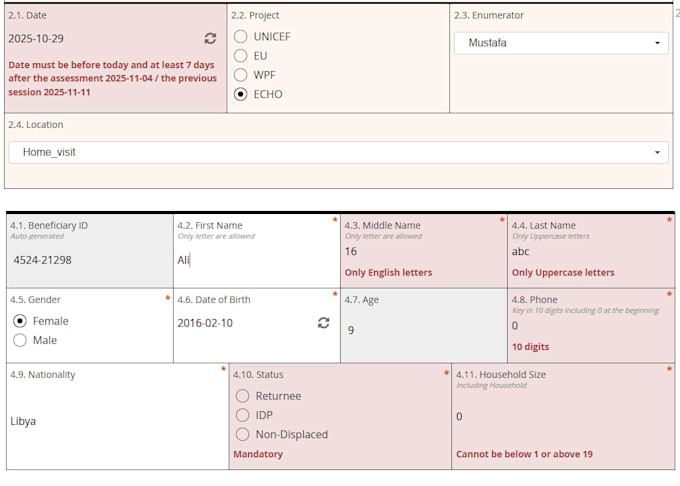
Every form I build undergoes a rigorous Quality Assurance (QA) process. I generate 100+ dummy records to stress-test the skip logic, validation rules, and automated calculations. This ensures a bug-free experience for your field enumerators.
5. Will you help me deploy the form to my server?
Yes. Whether you use the KoboToolbox Humanitarian Server or a private ODK Central instance, I can provide a step-by-step guide or direct assistance to ensure your XLSForm is uploaded, deployed, and ready for data collection.