Browse categories
Explore
Fiverr Pro
English
$
USD
Cloud, Security and AI Engineering for Your Business
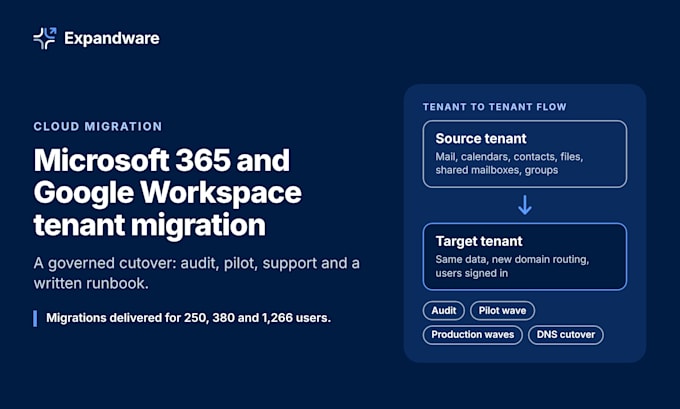
Expandware plans and runs Microsoft 365 and Google Workspace tenant migrations for organizations that cannot accept lost mail, missing files or an unplanned outage on cutover day.
Directions covered: Microsoft 365 to Microsoft 365 (tenant to tenant), Google Workspace to Microsoft 365, and Microsoft 365 to Google Workspace.
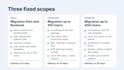
What we move: mailboxes, calendars, contacts, OneDrive or Google Drive files, shared mailboxes, groups, and DNS and mail routing. Premium adds SharePoint or shared drives, Teams content where the platform allows it, and single sign-on setup.
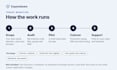
How we run it: we audit your source tenant, write a cutover runbook with a rollback plan, migrate a pilot wave, then production waves, switch DNS and mail routing, and support your users after cutover. Your administrators keep control of both tenants, and every approval point is documented.
Track record: migrations of 250, 380 and 1,266 users. The 1,266 user tenant to tenant project finished with no data loss and no downtime.
Not included: new licences, hardware, on premises Exchange servers, or more than 400 users in one order. Message us before ordering if your scope differs and we will confirm the fit.




Which migration directions do you cover?
Microsoft 365 to Microsoft 365, Google Workspace to Microsoft 365, and Microsoft 365 to Google Workspace. Any other source platform needs a message first so we can confirm scope.
What is the effect on our staff during cutover?
Mail keeps flowing. The switch happens in a window your organization approves, usually an evening or weekend. Staff sign in again afterwards and receive a written guide and notice templates beforehand.
How many users does one order cover?
Basic plans for up to 500 users. Standard migrates up to 100 users. Premium migrates up to 400 users. Larger projects are split into phases and scoped before you order.
Which data types are migrated?
Mailboxes, calendars, contacts, OneDrive or Google Drive files, shared mailboxes and groups. Premium adds SharePoint or shared drives and Teams content where the platform allows it.
Do you need our administrator passwords?
No. Your IT team creates a named administrator account for us with the least access the job needs and removes it at handover. Never send passwords in chat.
How do you control risk if a wave fails?
Every wave has a rollback step in the runbook, and source data stays untouched until your approver signs off. We log each failed item, then fix it or report it with a recommended action.
Is support after cutover included?
Standard includes 7 days and Premium includes 14 days. Support covers migration related issues for your users.
Are Microsoft or Google licences included?
No. Your organization buys the licences. Our migration tooling is included in the price.
Can you migrate more than 400 users?
Yes, in phases. Send us your user count and data volume, and we confirm scope before you order.
How is our data protected during migration?
Data moves between your own tenants over encrypted connections, and we keep no copy. Access is limited to the named administrator account and ends at handover.