Browse categories
Explore
Fiverr Pro
English
$
USD


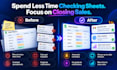
Stop losing potential customers because an important sales task was forgotten.
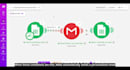
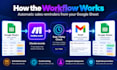
I will build a Make.com automation that monitors your Google Sheets sales records and alerts the right person when action is required.
The system can:
Check pending contacts automatically on a schedule
Identify records that need attention after a chosen number of days
Send personalized Gmail reminders to the assigned salesperson
Update your spreadsheet after each notification
Prevent repeated or unnecessary alerts
Work with your existing columns, statuses, timing rules, and email templates
This service is ideal for agencies, consultants, freelancers, startups, service businesses, and small sales teams using Google Sheets to manage prospects.
Instead of manually reviewing your spreadsheet every day, Make.com handles the routine monitoring automatically.
The result is a more organized sales process, timely communication, and fewer missed opportunities.
Send me your current spreadsheet structure and process, and I can customize the workflow around your business.
Business Automation: n8n, Make and AI Workflows
Languages
1. What do you need from me to build the automation?
I will need your Google Sheets structure, lead statuses, follow-up timing, reminder rules, Gmail requirements, and a short explanation of your current sales process.
2. Can you work with my existing Google Sheet?
Yes. I can customize the Make.com workflow around your current columns, statuses, salesperson assignments, dates, and lead-management process.
3. How do you prevent duplicate follow-up reminders?
The workflow can record when a reminder was sent and check that information before sending another notification, helping prevent unnecessary duplicate emails.
4. Can I choose how many days pass before a reminder is sent?
Yes. The follow-up period can be customized, such as 1, 2, 3, 5, or more days after the last contact or lead creation date.
5. Can reminders be sent to different salespeople?
Yes. The workflow can use salesperson information stored in Google Sheets to send reminders to the correct person responsible for each lead.
6. Can you customize the Gmail reminder message?
Yes. The subject, email text, lead information, salesperson details, and other dynamic fields can be customized to match your sales process.
7. Do I need coding knowledge to use the automation?
No. The workflow is built in Make.com using a maintainable no-code setup. I can structure it so your team can easily understand and manage the process.


