Browse categories
English
$
USD
Connect to your AI

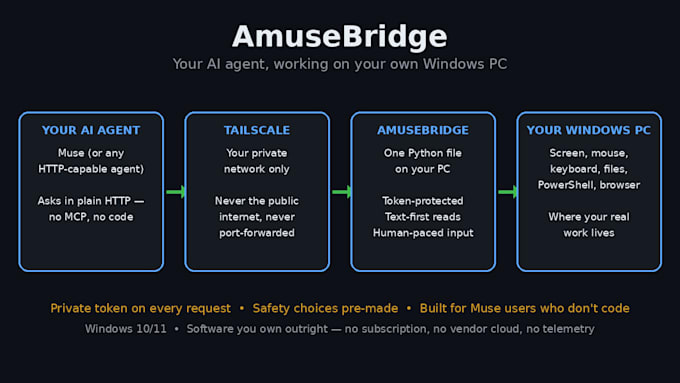

Your Muse is brilliant. It just can't touch your computer.
You ask it to file those documents or fetch that report, and you get back a beautiful plan. Then you do the clicking yourself. Why? Muse's built-in computer control is Mac-only. Your Windows PC, with your real files and programs, sits as a spectator.
AmuseBridge (v6.10) connects your Muse to your own Windows PC over your private Tailscale network, never the public internet. Your Muse does real work on the machine you already own. AmuseBridge is Windows-only.
And nothing runs unless you click yes. Every command appears on your screen first, spelled out exactly as it will run. Only your click approves it. An agent can't approve itself. Ever.
You get the ready-to-run app, an offline license key, the full source code under license, and guides your own Muse follows to connect you. I help with the install until you are connected; after that, your own Muse is your support.
Connected, or you don't pay. If it won't run on your machine and we can't fix it together, you get a refund.
Pick your package below and order. Your Muse is ready to work. Give it your PC, with your hand on the gate.
Custom AI bot templates by Botwrights
Languages
Is it safe? Can my Muse run things without my approval?
No. Every command appears in an approval pop-up first, spelled out exactly as it will run, and only your click approves it; no answer counts as No. In testing, over 28,000 pop-ups were checked and no two different commands ever shared one. Commands also ship switched OFF.
What exactly do I need to use this?
Three things: a Windows 10 or 11 PC, a Muse, and Tailscale, the free private-network app, installed and signed in on the PC. Nothing else: no Python, no extra software. Your Muse follows the included setup guide with you. Missing something that can't be worked around? Connected, or refunded.
I'm not technical. Can I actually install this?
Yes. It was built for people who know no code. Double-click the app, paste in your license key, read the agreement, click I Agree. The picture guide shows every step, and your own Muse walks you through the rest. Stuck? Message me in the order thread until you are connected, or you don't pay.
What if it won't install on my machine?
We fix it together or you get a refund, in that order. The common snag is known: some antivirus flags mouse-and-keyboard simulation, so your delivery includes a guide to add one folder exclusion before you install. Never turn your antivirus off. After setup, your own Muse is your support.
Does it work on a Mac?
No. AmuseBridge is Windows-only, and if you are on a Mac you don't need it: Muse's built-in computer control already works there. This exists for Windows owners, who were left out. Ordered by mistake for a Mac? Message me in the order thread and I will refund you.
Why not just use a free or open-source bridge?
You can, and you get code with nobody behind it: the install is your problem, and the safety behavior is taken on faith. AmuseBridge includes its full source too. Your money buys a ready-to-run app, your own license key, published limits, and a seller who answers. Connected, or you don't pay.
Is my PC exposed to the internet?
No. AmuseBridge listens only on your PC and your private Tailscale address, never the open internet, and every request needs your secret token, generated on your PC and stored encrypted under your Windows user. No account, no cloud relay. Can't be made to work on your PC? You don't pay.
