Browse categories
English
$
USD
Connect to your AI


PERSONAL FINANCE TRACKER | POWER BI
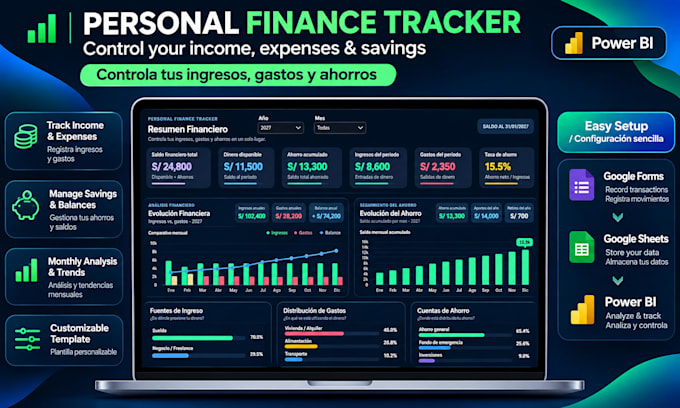
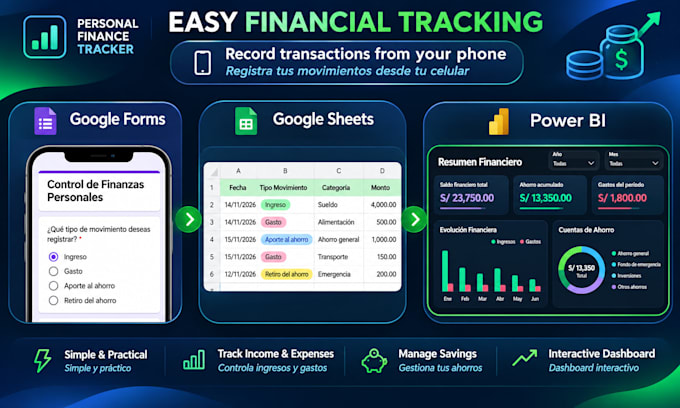
Track income, expenses, savings and balances in one interactive dashboard. Record transactions on your phone with Google Forms and store them in Google Sheets.
INCLUDED:
PACKAGES:
TRY THE LIVE REPORT / PRUEBA LA VISTA DEL REPORTE:
https://app.powerbi.com/view?r=eyJrIjoiNDQ2MDNiMDgtNmI0MS00NTYyLTllNmYtMGQ5ZTYzOWI4Y2Q0IiwidCI6IjBlMGNiMDYwLTA5YWQtNDlmNS1hMDA1LTY4YjliNDlhYTFmNiIsImMiOjR9
ESPAÑOL:
Controla tus ingresos, gastos y ahorros. Registra movimientos desde el celular con Google Forms y analízalos en Power BI. Incluye formulario, plantilla y manual PDF.
IMPORTANT / IMPORTANTE:
Dashboard and manual currently in Spanish / Actualmente en español.
Power BI Desktop for Windows required. Manual refresh; no Pro subscription needed for local use.
Requiere Power BI Desktop para Windows. Actualización manual.
Business Management Engineer Data Analyst Power BI Specialist
Languages
Do I need Power BI Pro? / ¿Necesito Power BI Pro?
No! You only need the free Power BI Desktop for Windows. No paid subscription is required. ¡No! Solo necesitas Power BI Desktop gratuito para Windows. No se requiere una suscripción de pago.
Does the dashboard update automatically? / ¿Se actualiza automáticamente?
Data is saved in Google Sheets. Simply click Refresh in Power BI Desktop to see your latest transactions. Los datos se guardan en Google Sheets. Solo debes pulsar Actualizar en Power BI para ver tus movimientos.
Can I track expenses from my phone? / ¿Puedo registrar gastos desde mi celular?
Yes! Use Google Forms on your phone to record income, expenses and savings. The dashboard is viewed in Power BI Desktop. ¡Sí! Registra ingresos, gastos y ahorros desde Google Forms en tu celular. El dashboard se visualiza en Power BI Desktop.
Is the template easy to install? / ¿Es fácil instalar la plantilla?
Yes! You'll receive a PDF guide to copy Google Forms, connect Google Sheets and set up Power BI. No coding required. ¡Sí! Recibirás una guía PDF para copiar el formulario, conectar Google Sheets y configurar Power BI. Sin programación.
Can I customize the dashboard? / ¿Puedo personalizar el dashboard?
Yes! Currency and opening balances are configurable. Standard and Premium packages include additional category customization. ¡Sí! Puedes configurar moneda y saldos iniciales. Standard y Premium incluyen personalización adicional de categorías.
Can I track different savings accounts? / ¿Puedo controlar varias cuentas de ahorro?
Yes! Track deposits, withdrawals and balances across savings accounts. Transfers are not counted as new income or expenses. ¡Sí! Controla aportes, retiros y saldos por cuenta. Las transferencias no se consideran nuevos ingresos ni gastos.
Is my financial information private? / ¿Mis datos financieros son privados?
Your records stay in your own Google account. Power BI connects using your authorized access. No banking credentials required. Tus registros permanecen en tu cuenta de Google. Power BI se conecta con tu autorización. No necesitas compartir claves bancarias.
Is the dashboard available in English or Spanish? / ¿Está disponible en inglés o español?
The current dashboard and installation guide are in Spanish. The English version is being prepared. El dashboard y el manual actuales están en español. Estamos preparando la versión en inglés.