Browse categories
Explore
Fiverr Pro
English
$
USD




Is your Make automation failing, sending incorrect data, creating duplicates, or stopping without a clear reason?
I will diagnose and repair your existing Make scenario so it runs reliably and does what it is supposed to do.
I can troubleshoot:
Failed modules and incomplete runs
Webhooks, triggers, filters, and routers
Incorrect field mapping and data formatting
HubSpot CRM workflows and duplicate records
Google Sheets, Gmail, Slack, and Airtable connections
API requests, JSON, authentication, and error responses
OpenAI or Gemini modules already used in your scenario
Error handling, fallback routes, and notifications
My process:
This Gig is for troubleshooting and improving existing Make automations. Building a completely new workflow is not included unless agreed upon before ordering.
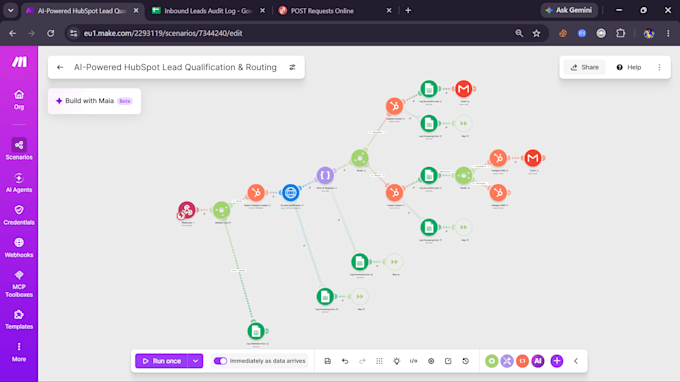
If your issue matches the limits of a package, you may order directly. If you are unsure, send me a screenshot of the scenario, the error message, and the expected result. I will tell you which package fits before you
Make Automation and CRM Specialist
Languages
Do I need to contact you before ordering?
If the problem clearly fits a package, you may order directly. If you are unsure, send a screenshot of the scenario, the error message, and the expected result so I can confirm the correct package.
Can you build a new Make automation from scratch?
This Gig focuses on repairing and improving existing Make scenarios. I can build a new workflow, but its scope and price must be agreed upon before you order.
What access will you need?
Usually, I will need access to the affected Make scenario and its run history. Depending on the issue, temporary access to a connected app may also be required. Please never send passwords in chat; use secure invitations or connections.
Do you fix OpenAI or Gemini integrations?
Yes. The Premium package can include troubleshooting one existing OpenAI or Gemini integration inside a Make scenario. A new AI agent or a large AI workflow requires a custom offer.
What counts as a revision?
A revision covers adjustments within the originally agreed issue and scope. If the delivered fix does not work as agreed, I will correct it. New features, additional scenarios, or unrelated problems require a separate order or custom offer.