Browse categories
Explore
Fiverr Pro
English
$
USD


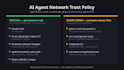

Your AI coding agent can read your files, run shell commands, and reach the network - usually without you ever seeing what it actually touches. That's useful, and it's a real attack surface: a bad prompt injection or a compromised tool call can leak data or do damage, and most setups have zero visibility into it.
I set up real, working controls - not a checklist, an actual configured system:
Interactive outbound monitoring (OpenSnitch or equivalent) scoped to your actual agent tools, catching genuinely new connections without nagging you on every legitimate call
A reasoned trust policy: which processes get standing access, which stay on a short leash, and why. Blanket-trusting a shared interpreter like python defeats the whole point - I don't do that
Zero-trust remote access setup (Twingate or equivalent) if you want to safely reach services on your network without opening ports
A written report on what each agent can actually reach and how to extend the policy yourself
Every rule is built and tested against your actual tools, live, on your machine.
Freelance AI Pipeline Engineer
Languages
Will this block my agent from doing its normal work?
No - that's the actual point. The goal is safe, not neutered. Standing rules get built for your real tools so they keep working uninterrupted; only genuinely new or unexpected activity gets flagged.
What if I'm on Windows or macOS, not Linux?
Standard and Premium still apply - the tools differ (Little Snitch on macOS, comparable options on Windows) but the same reasoned-policy approach applies. Flag your OS up front so I scope the right tooling.
Do you need access to my actual machine?
Premium includes a screenshare session for the live setup. Basic and Standard can often be done from your exported config plus a written runbook you apply yourself - ask if you'd prefer that.


