Browse categories
Explore
Fiverr Pro
English
$
USD
Professional OBS Studio setup for smooth stable live streaming
Want a professional streaming setup without the stress?
Whether you're a gamer, content creator, podcaster, or live seller, I'll configure your setup for smooth performance, crystal-clear audio, and a reliable streaming experience.
What I Can Set Up:
Supported Platforms:
Why Choose Me?
Please message me before ordering so I can review your setup and recommend the best package for your needs.
Software:
OBS Studio
Platform:
•
Twitch
•
YouTube
•
Mixer
•
Kick
Purpose:
Gaming
•
Music
•
Lifestyle
•
Business
•
News
•
Streamshare
•
Webinar
What streaming software do you support?
I support OBS Studio, Streamlabs Desktop, and related streaming tools. I'll configure the software based on your hardware, streaming platform, and specific requirements.
Can you set up both Single PC and Dual PC streaming?
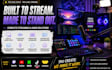
Yes! I can professionally configure both Single PC and Dual PC streaming setups, including capture cards, audio routing, and performance optimization.
Which streaming platforms do you support?
I can configure your setup for Twitch, YouTube Live, Kick, TikTok Live Studio, Whatnot, Facebook Live, and other compatible streaming platforms.
What hardware can you configure?
I support Stream Deck, GoXLR, GoXLR Mini, RØDECaster Pro II, RØDECaster Duo, Elgato Capture Cards, Wave XLR, Wave Link, Voicemeeter, webcams, microphones, and many other streaming devices.
Do I need to install any software before the session?
If any required software isn't already installed, I'll let you know what to download before we begin to make the setup process as smooth as possible.
Can you fix audio, video, or sync issues?
Absolutely. I can troubleshoot common problems such as audio routing, echo, microphone noise, delayed audio, video lag, frame drops, and synchronization issues.
Will my setup be fully tested before delivery?
Yes. Every completed setup is tested to verify that your audio, video, scenes, and streaming workflow function correctly before I deliver the order.
Do you provide remote support?
Yes. The setup is completed remotely using a secure remote access application with your permission. Your privacy and system security are always respected.
What information do you need before starting?
Please provide details about your PC setup, streaming goals, hardware (such as Stream Deck, GoXLR, or capture cards), and the platform you plan to stream on. This helps me recommend the right package.
Why should I choose your service?
I focus on delivering a complete, reliable streaming setup—not just installing software. Every configuration is customized for your hardware and goals, thoroughly tested, and optimized so you can stream with confidence.


