Browse categories
Explore
Fiverr Pro
English
$
USD
Senior IT Specialist and Retail Operations Expert
STOP struggling with your printer and get back to work!
Is your printer showing "Offline" for no reason? Are drivers refusing to install? Or maybe you just bought a new machine and the software setup is a nightmare?
I am Vijay, a professional IT Support Specialist. I specialize in Remote Software Configuration and Network Troubleshooting. I solve 99% of printer connectivity and software issues efficiently via remote access.
What I Can Do For You Today: Fix "Printer Offline," "Spooler Error," and "Error Printing" software messages. Complete Wireless/WiFi setup for Laptops, PCs, and Mobile devices. Install/Update correct Drivers & Firmware for HP, Canon, Epson, Brother, and more. Configure Scan-to-Email and Cloud printing software. Resolve Network conflicts and IP address issues.
Why Choose My Service?
Ready to print? Click the 'Continue' button and lets get started!
Note: This gig is for software, driver, and networking support ONLY.



Device:
Desktop
•
Laptop
•
Mobile
•
Router
•
Printer
Operating system:
Windows
•
IOS
•
Android
•
OSX
1. How do you connect to my computer remotely?
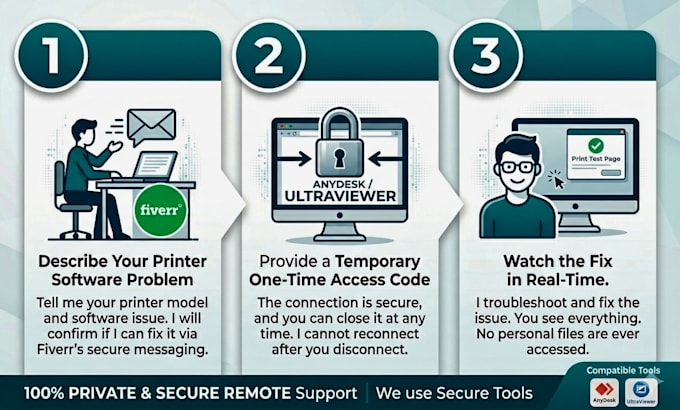
Answer: I use industry-standard, secure remote desktop tools like AnyDesk or TeamViewer. You will provide me with a temporary access code, and you can watch everything I do on your screen in real-time. You can end the session at any moment.
2. What if you are unable to fix my software issue?
Answer: My goal is 100% satisfaction. If the problem is software or driver-related and I am unable to resolve it, I offer a full refund. Your success is my priority.
3. Do you support both Mac and Windows?
Answer: Yes! I am fully experienced in troubleshooting printer software, driver conflicts, and network settings for both Windows (10/11) and macOS.
4. Do you fix physical hardware or paper jams?
Answer: No, I specialize exclusively in Software, Drivers, and Networking. I do not provide assistance for physical hardware issues like broken parts, paper jams, or ink leaks. Please ensure your printer is powered on and physically functional before ordering.
5. We are in different time zones. When can we start?
Answer: I prioritize my schedule to be available during US Business Hours (EST/PST). If you see me "Online," I can usually start immediately. If I am offline, please message me, and I will respond as soon as I am back to schedule a time that works for you.
6. Do I need to buy any software for the remote session?
Answer: No, you do not need to buy anything. Both AnyDesk and TeamViewer have free versions for personal use. I will guide you on how to set them up in just a few clicks so we can begin the fix.