Browse categories
English
$
USD
Connect to your AI

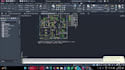


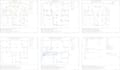

Are you looking for a professional AutoCAD lighting and switching layout for your residential or commercial floor plan?
I will create a clean, accurate, and well-organized lighting and switching layout using AutoCAD, based on your provided architectural floor plan or sketch.
What you will get:
- Lighting fixture placement and arrangement.
- Switch locations and identification.
- Lighting and switch connections.
- Professional electrical symbols and annotations.
- Neat, organized AutoCAD drawing.
- Editable DWG and high-quality PDF files.
Why choose my service?
- Accurate and detailed drafting.
- Professional drawing presentation.
- Clear electrical symbols and labeling.
- Timely delivery.
- Revisions according to the selected package.
What I need to get started:
Please provide your architectural floor plan in PDF, DWG, or image format, together with any lighting and switching requirements.
Let's turn your floor plan into a professional electrical lighting and switching drawing!
Please inform the freelancer of any preferences or concerns regarding the use of AI tools in the completion and/or delivery of your order.
AutoCAD Drafting Specialist
Languages
What file formats do you accept?
DWG, PDF, JPG, PNG, and hand-drawn sketches.
Can you create a lighting and switching layout from a PDF or image?
Yes. I can recreate the required layout in AutoCAD using your provided floor plan.
Yes, editable DWG and PDF files are available according to the selected package.
Yes, editable DWG and PDF files are available.
Do you provide socket outlet layouts?
No. This gig focuses exclusively on lighting and switching layouts. Check out my profile for other gigs that focuses on socket layout
Can I request specific lighting fixtures and switch locations?
Yes. You can provide your requirements and preferences before I begin.


