Browse categories
Explore
Fiverr Pro
English
$
USD
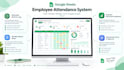
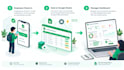
Still tracking attendance with paper sign-in sheets or a messy spreadsheet? I build attendance systems your staff actually enjoy using one tap on their phone, and everything else happens automatically.
No typing, no timesheets to chase down, no end-of-month spreadsheet cleanup. Just a live, color-coded calendar that tells you exactly who was late, who was missing, and who showed up right on time.
Runs entirely on tools you already have nothing new to buy, no monthly fee. I hand over full ownership on delivery, with setup support so it just works from day one.
Already built and running for a 30+ person hospitality team this isn't a theory, it's proven. Message me and let's get your team off paper for good.

Technology:
Excel
•
Google Sheets
•
Python
•
VBA
Do I need to buy any software?
No — this runs entirely on Google Forms, Sheets, and Apps Script, which are free with any Google account.
Is this just a spreadsheet template I fill in myself?
No. This is a working automated system — your staff tap a button on their phone, and Google Apps Script does everything else in real time (timestamps, late detection, calendar updates). There's nothing to manually calculate or type in afterward, unlike formula-only or VBA-based templates.
Who owns the system after delivery?
You do, fully. I build it, then transfer ownership of the Form and Sheet to your Google account before final delivery.
Can this integrate with payroll?
Not directly out of the box, but I offer a Payroll Calculator add-on that pulls hours straight from your attendance data and calculates pay based on your rate and overtime rules.
What happens if it breaks after the support window ends?
I offer a paid monthly maintenance add-on for ongoing support, or you can order a one-off fix separately.
How does it tell "Absent" apart from "On Leave" if both mean no clicks that day?
By default it doesn't distinguish — both would need to be manually corrected, or you can add the Leave-Request add-on which handles that automatically.


