Browse categories
Explore
Fiverr Pro
English
$
USD



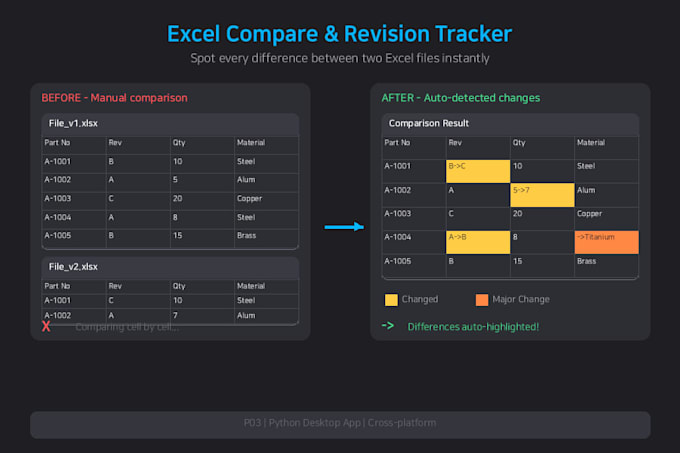
Someone sends you "the updated version" of a spreadsheet and you have no idea what actually changed. This app answers that in seconds, on Windows and Mac.
WHAT IT DOES
- Compares two .xlsx files and marks every difference: added (green), modified (orange), deleted (red)
- Double-click any change to see the exact before and after values
- Rows inserted or deleted in the middle stay tracked. Most comparison tools shift out of alignment and flag everything below as changed. This one matches rows first, so one inserted row reads as one inserted row
- Revision tracking: save snapshots of a single file over time, then compare any two versions - Rev 4 against Rev 10, months apart
- Export the comparison as a report for audits or team review
WHAT YOU GET
- The full app for both Windows and Mac. No Python, no Excel, no installation
- A setup guide
- Direct support from me if anything does not work
NEEDS TO FIT YOUR WORKFLOW?
That is most of what I do. Custom comparison rules, batch processing across many files, a report in your own layout, VBA work - message me and I will scope it.
14 years of systems engineering. I run automated systems in production daily.
Python Automation Engineer, Telegram Bots, Excel VBA
Languages
Does this work on both Windows and Mac?
Yes. Both versions are included and you get the one you need. Tell me your operating system after ordering.
Do I need Python or Excel installed?
Neither. Everything the app needs is bundled. You only need the .xlsx files you want to compare.
On Mac it says the app cannot be opened. Is something wrong?
No, that is normal for software delivered outside the Mac App Store. Open System Settings, go to Privacy & Security, scroll down and click "Open Anyway". The included guide shows each step with screenshots. It takes a minute and only happens once. Windows opens directly with no extra steps.
What file formats are supported?
.xlsx only. .xls and .csv are not supported. Password-protected files cannot be opened.
Can you adapt it to my workflow?
Yes, that is most of my work. Message me with what you need and I will give you a fixed quote before you order.