Browse categories
Explore
Fiverr Pro
English
$
USD

Introduction:
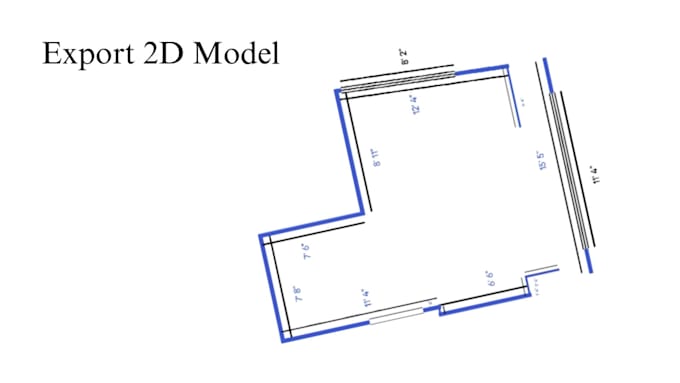
With this floor plan application, you can scan your room along with measurements/dimensions and convert it into a 3D model to add your custom labels and export the 3D model in USDZ format.
Usage Instructions:
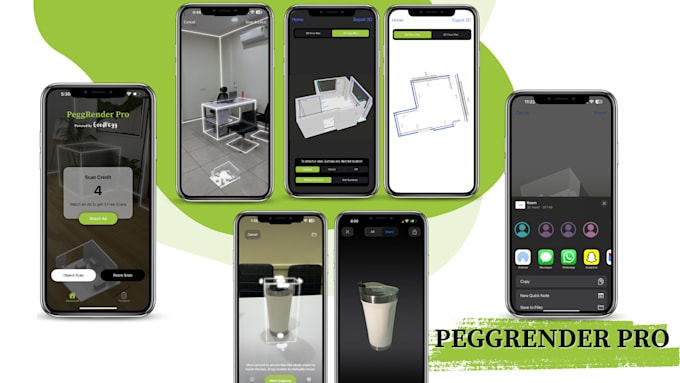
1. Upon opening the application, you'll see an introduction screen and a "Scan" button.
2. Clicking the "Scan" button you will see an alert to request access to the camera.
3. Once camera access is granted, follow the graphical instructions, and the app will start creating a real-time 3D model.
4. After scanning is complete, click the "Save & Label" button.
5. Upon clicking "Save & Label," you'll be directed to a screen displaying the 3D model of your scanned room. Here, you can click on any location and add a label with your text, e.g., entrance, window, kitchen, pantry.
6. Once labels are added, you can export the 3D model and save it in another app or share it via installed iPhone apps such as WhatsApp, Snapchat, Gmail, etc.
Additionally:
The generated model is in USDZ format, allowing you to import it into various 3D modelling/rendering applications such as Cinema 4D, Shapr3D, or AutoCAD to edit it.
AI, AR, VR, VoIP, ChatGPT, DeepSeek integration
Languages
Why should you take it?
With this app, scan your room or flat to create a 3D model, add custom labels, and export in USDZ format. Property owners can scan flats, save models on devices, and show them to clients remotely. Import the USDZ model into apps like Cinema 4D or AutoCAD to preview room designs with furniture.
Who is going to use it?
Construction business owners can use this app to showcase their properties in 3D models instantly to customers. Interior designers can create home 3D models and use them for design in various apps like AutoCAD and Unreal Engine.
Does it have an AR integrated?
Yes, this application works with AR.
Can you edit the 3D model created with the app for placing beds, sofas, tables etc?
This app creates the 3D model in USDZ format. You can use this model in apps like Cinema 4D or AutoCAD to see how the furniture fits before making changes in real-time.