Browse categories
English
$
USD
Connect to your AI
Excel Dashboards, Data Cleaning, PDF Conversion, Python Automation
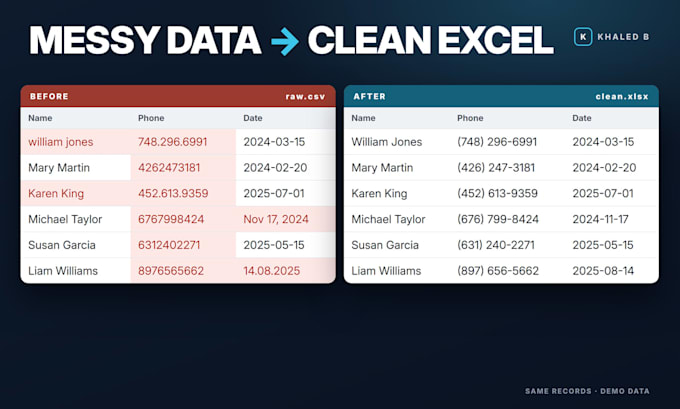
Messy exports slow everything down. I turn spreadsheets and CSV files into clean, consistent, analysis-ready data, with a clear record of what changed.
What I clean:
Ambiguous values are never guessed or silently deleted. They stay in the file and are listed for your decision.
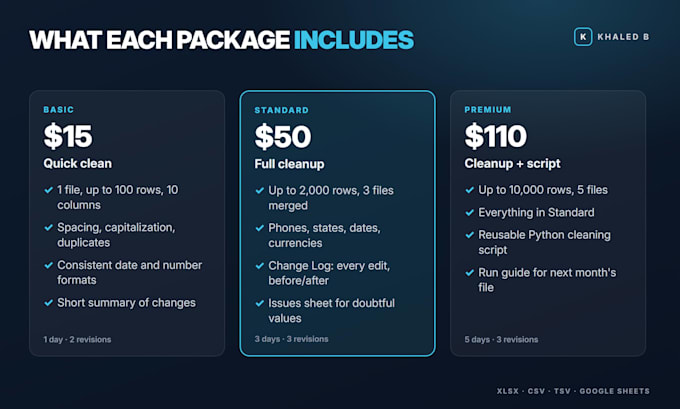
What each package includes:
Need more rows? Add the Extra 1,000 rows option or message me for a custom offer.
Delivered as Excel (XLSX), CSV or Google Sheets. Your files are used only for your order.
Gallery examples use synthetic demonstration data.


Will you delete data I might need?
No. Duplicates are removed only by a rule we agree on, and doubtful values are kept and listed on an Issues sheet for you to review.
Which file types do you accept?
XLSX, XLS, CSV, TSV and Google Sheets. For data locked in PDFs, message me first so I can confirm the scope.
Is my data kept private?
Yes. I use your files only for your order and delete my working copies after delivery on request.
What if my file is larger than the package?
Add one Extra 1,000 rows option per additional 1,000 rows, or send me your row count and I'll send a custom offer.
Which packages include the Change Log and Issues sheet?
Standard and Premium. Basic includes a short summary of the changes made. The Change Log lists every edited cell with its before and after value; the Issues sheet lists values I could not safely fix.