Browse categories
Explore
Fiverr Pro
English
$
USD

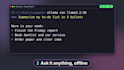


Get a private AI assistant running on your own Windows PC with Ollama or OpenClaw: no monthly fees, and your data stays on your machine.
I install and configure Ollama, OpenClaw or a similar local AI stack on Windows, pick a model that actually fits your hardware, and test it end to end. Everything is done over a remote session (AnyDesk or Chrome Remote Desktop), so you don't touch a command line.
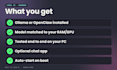
What you get:
- A working local AI assistant on your Windows PC
- A model matched to your RAM and GPU
- Optional chat channel (Telegram or web chat), auto-start on boot and a one-page cheat sheet
- Premium: tools/skills, API integrations and 7 days of support
Before ordering, message me your PC specs (CPU, RAM, GPU) and what you want the assistant to do. I'll tell you straight if your machine can handle it.
AI automation, data cleanup and Windows fixes for small businesses
Languages
Does my PC need a GPU?
No, but it helps. Small models run on CPU with 16 GB RAM. I'll recommend a model that fits your hardware.
How is the work delivered?
Through a live remote session (AnyDesk or Chrome Remote Desktop). You watch everything I do.
Is my data private?
Yes. The model runs on your PC. Nothing is sent to a cloud AI unless you ask for an API integration.
Do I need to pay for any software?
No. Ollama and OpenClaw are free. Paid APIs are only used if you request them, on your own account.
Do you support Mac or Linux?
This gig is Windows only. Message me first for anything else.
Which models can you run?
Llama, Mistral, DeepSeek, Qwen and similar open models, sized to your RAM and GPU so they run smoothly.
What if my PC is too weak?
Send me your specs before ordering. I'll tell you honestly what will run well, or recommend a lighter model, before you pay.


