Browse categories
Explore
Fiverr Pro
English
$
USD
Data Analyst Power BI and Excel Dashboard Expert SQL and Python
I Will Create Automated Excel Dashboard with Advanced Formulas & Power Query
Tired of manual data cleaning? I convert RAW MESSY DATA to STUNNING 1-Click Automated Dashboard!
I specialize in POWER QUERY Auto Cleaning - No more daily manual work!
WHAT YOU GET:
Power Query Automation - Auto Clean, Trim, Remove Duplicates, Fix Dates, Merge Files (1-Click Refresh)
Advanced Formulas - XLOOKUP, VLOOKUP, INDEX+MATCH, SUMIFS, IFERROR, Dynamic Ranges
Pro Dashboard - Interactive Charts, Slicers, Pivot Tables, KPIs, Conditional Formatting
100% Automated .XLSX File - Clean Design, All Formulas Unlocked
WHY ME?
- Power Query Expert (Not Just Charts)
- Save 10+ Hours Weekly
- Future-Proof, No VBA Needed
Perfect for Sales, Finance, Inventory, Budget & Business Reports.
Send your sample data & Get Your Automation Today!

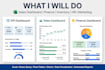

FAQ 1: Q: What do you need to start my Excel dashboard?
A: Please send me: 1. Your raw Excel / CSV file (messy data is OK!) 2. What charts/KPIs you need (Sales, Finance, etc.) 3. Any example design you like I will setup Power Query to auto-clean your data - you just refresh with 1 click!
FAQ 2: Q: Will I get editable file and support?
A: YES! You get: ✅ 100% Editable .XLSX file ✅ All formulas unlocked (XLOOKUP, SUMIFS etc.) ✅ Power Query setup with 1-click refresh ✅ 14 Days Free Support after delivery ✅ Video guide how to refresh data
FAQ 3: Q: Can you work with Google Sheets and large data?
A: Yes! ✅ Excel: Up to 500k rows with Power Query (Super Fast) ✅ Google Sheets: I will use QUERY, ARRAYFORMULA, Apps Script for automation ✅ Large Data: Power Query handles 1M+ rows easily, no slowdown! Just tell me your file size before ordering.
FAQ 4: Q: What will I get in delivery?
A: You will get: 1. Automated Dashboard Excel File (.XLSX) 2. Power Query Auto-Cleaning Setup 3. Raw Data + Cleaned Data + Dashboard Sheets 4. Pivot Tables & Advanced Formulas 5. No VBA, Future-Proof Solution! Ready to use - Just click REFRESH for new data!


