Browse categories
Explore
Fiverr Pro
English
$
USD
Microsoft Entra ID and Active Directory Security Architect
Still using SMS codes for Microsoft 365 sign-in, or have no MFA at all?
Microsoft is retiring SMS and voice-call MFA in Entra ID. From 1 February 2027, users who only have SMS or phone call set up will be blocked until they register a new method.
Ill move your organisation to secure MFA with Microsoft Authenticator and passkeys, without lockouts or a flood of help-desk tickets.
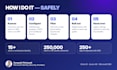
What I do:
Why me:
15+ years as a Microsoft Identity Security Architect, rolling out Azure MFA, Windows Hello and Conditional Access for enterprises in Aerospace, Healthcare and Banking.
Not sure where to begin? The MFA Readiness Check is a great first step.
Every tenant is different, so please message me before ordering. I'll review your needs and recommend the right package. I'm happy to help!


Cloud provider:
Microsoft Azure
What happens if we don’t move to the Microsoft Authenticator app?
From 1 February 2027, Microsoft will stop sending SMS and voice-call MFA codes. Users who only have SMS or phone call set up will be blocked at sign-in until they register a new method, such as a passkey. This usually causes lockouts and a spike in help-desk calls.
We don’t have MFA yet. Is this gig for us?
Yes. I’ll set it up from scratch with Authenticator and passkeys, so you won’t need to migrate again later.
Will users be locked out?
No. SMS stays as a fallback until each user registers a new method, and changes go to a pilot group first.
What about users without smartphones or on shared devices?
I plan options for them, such as FIDO2 security keys or Windows Hello, or a documented exception.
Which licence do we need?
Authenticator and passkeys work on any Microsoft 365 plan. Conditional Access needs Entra ID P1/P2, which is included in Business Premium and E3/E5.


