Browse categories
Explore
Fiverr Pro
English
$
USD
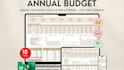
I build Microsoft Excel and Google Sheets systems where formulas, VBA macros, and dashboards are intentionally built to control data flow, automate repeat processes, and preserve accuracy under real usage.
This service is for spreadsheets that must remain predictable, auditable, and stable as data volume and complexity increase.
What I Offer:
Send your spreadsheet or explain the problem you want solved. I'll build a system that works correctly and stays reliable.

Platform:
Excel
•
Google Sheets
•
OpenOffice
Development technology:
VBA
•
Google Apps Script
•
Power Query
Expertise:
Formatting
•
Fixing
•
Forms
•
Pivot tables
•
Formulas
What type of spreadsheet work do you specialize in?
I specialize in logic-driven Excel and Google Sheets systems, including advanced formulas, VBA macros, automation, dashboards, and full spreadsheet rebuild.
Is this suitable for simple spreadsheet tasks?
This service is best suited for non-trivial spreadsheets that require structured logic, automation, or long-term stability. Simple data entry sheets may not need this level of work.
Do you build spreadsheets from scratch or fix existing ones?
Both. I can design a system from the ground up or audit, refactor, and stabilize an existing file.
When do you use Excel VBA instead of formulas?
VBA is used when workflows require user-triggered actions, sequential steps, or controlled processes that formulas cannot reliably handle.
Will the spreadsheet be easy for non-technical users?
Yes. While the logic is advanced, inputs are simplified and protected, making the system easy to use without understanding the underlying formulas.
Can the spreadsheet handle growth and larger datasets?
Yes. Files are structured to scale without breaking formulas or degrading performance.
Do you reuse templates or existing files?
No. All systems are custom-built based on your data, workflow, and goals.
Do you work with both Excel and Google Sheets?
Yes. Platform choice depends on automation needs, collaboration requirements, and performance considerations.
Will formulas and macros be protected from accidental edits?
Yes. Calculation logic and macros are protected while keeping input areas accessible.
