Browse categories
Explore
Fiverr Pro
English
$
USD


Are you a pharmacy owner, medical store, or medicine distributor looking for a complete software solution to manage your business?
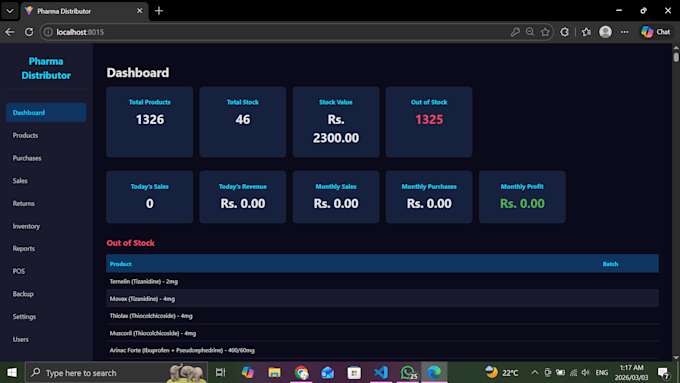
I will provide you with a fully-featured Pharma Distributor System (PDS) a powerful Windows desktop application built specifically for pharmacies and medicine distribution businesses.
What You Get:
Point of Sale (POS) with barcode scanning and receipt printing
Product management with batch tracking and expiry alerts
Purchase & sales management with full history
Inventory tracking with low stock and expiry notifications
Auto calculation of Sales Tax & Further Sales Tax
Sales & purchase returns management
Daily, monthly, profit & inventory reports
Organization settings (name, NTN, phone, address on receipts)
User login system (Admin & Cashier roles)
Database backup & restore system
One-click Windows installer (.exe) with desktop shortcut
Why Choose This System:
Works 100% offline no internet or monthly fees
Fast & lightweight runs on any Windows PC
Secure hardware-locked license
Clean, modern, dark-themed UI
Built with React + FastAPI + SQLite
Easy installation install and start immediately
Perfect for pharmacies, medical stores, and distributors who want
Nextjs Web Apps with Neon DB AI Agents are scalable and smart
Languages
How do I install and run the application?
Run PDSSetup.exe and follow the installation wizard. After installation, double-click the "Pharma Distributor" shortcut on your desktop. The app will start automatically and open in your default web browser at localhost:8015.
What are the default login credentials?
Username: admin Password: admin It is strongly recommended to change the default password after your first login from the Users management page.
How do I activate my license key?
On first launch, the License Activation screen appears. Your Machine ID is displayed on screen. Share this ID with the developer to receive a license key. Enter the key and click Activate. Three tiers are available: - Starter (1 PC), Professional (3 PCs), Enterprise (unlimited).
How do I add products to the system?
Go to Products page and click "Add Product". Fill in details like name, pack size, batch number, expiry, purchase price, sale price, quantity, barcode, sale tax, and further sale tax. You can also import products in bulk using a CSV file or load the default Pakistan medicines list.
How does the POS (Point of Sale) work?
Navigate to the POS page. You can: - Scan a barcode to add products to cart instantly - Search products by name using the search box - Adjust Qty, Disc%, Sale Tax, and Further S.Tax per item - Click Checkout to complete the sale - Print the receipt or start a new sale All tax
How are Sale Tax and Further S.Tax calculated in POS?
When you add a product to the cart, the Sale Tax and Further S.Tax values are automatically pulled from the product's saved tax amounts. You can also manually edit these values in the cart before checkout. The formula is: Total = (Sale Price x Qty) - Discount + Sale Tax + Further S.T
How do I process a return (sale or purchase)?
Go to the Returns page. Select either "Sale Return" or "Purchase Return". Choose the original sale/purchase record, specify the product, quantity to return, date, and reason. - Sale returns: stock increases back automatically - Purchase returns: stock decreases automatically
How do I backup and restore my data?
Go to the Backup page. - Click "Create Backup" to save a copy of your database - Backups are stored in C:\PharmaDistributor\backups\ - To restore, select a backup file and click "Restore" It is recommended to create regular backups to prevent data loss.
Where is my data stored? Does it need internet?
All data is stored locally on your computer: - Database: C:\PharmaDistributor\data\database.db - Settings: C:\PharmaDistributor\data\config.json - License: C:\PharmaDistributor\data\license.json - Backups: C:\PharmaDistributor\backups\ No internet connection is required. The ap
How do I update my organization details (name, phone, etc.)?
Go to Settings page. Enter your organization name, phone number, NTN, address, and email. Click Save. These details will appear in the sidebar, browser tab title, and on all POS receipts automatically.