Browse categories
Explore
Fiverr Pro
English
$
USD
Online Computer Science and maths Teacher
Learn Scratch Programming for Kids | Online Coding Classes
Want a fun way to introduce your child to coding? I teach Scratch programming for kids the block-based coding language from MIT, used worldwide to build games, animations, and stories.
Whether your child is a complete beginner or has tried Scratch before, I guide them through live 1-on-1 online coding lessons that keep learning fun and hands-on.
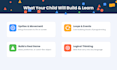
What your child will learn:
Why learn with me:
CS teacher with 5 years classroom experience and 6 years mentoring students on projects. I make coding for kids simple, interactive, and fun.
Perfect for:
What you'll need:
Just a laptop and internet Scratch runs free in the browser.
Message me before ordering to tailor sessions to your child's age and interests. Let's turn screen time into skill-building time!

Lesson purpose:
Programming language
Student age:
Teen (13–17)
Development technology:
Other
Does my child need any software installed?
Scratch runs completely free in the browser at scratch.mit.edu. No downloads or installation needed, just a laptop/computer and internet connection.
What age group is this suitable for?
This gig is best suited for kids ages 8–14. If your child is younger or older, message me first and we can discuss whether it's a good fit.
My child has zero coding experience — is that okay?
Yes, absolutely. This gig is designed for complete beginners. No prior coding knowledge is required.
What platform do we use for the live sessions?
Sessions are conducted over video call (Zoom/Google Meet/Skype — mention your preferred platform), with screen sharing so your child can follow along and code in real time.
Can I reschedule a session if something comes up?
Yes, sessions can be rescheduled with at least 24 hours' notice. (Adjust this to your actual policy.)
Will my child get to keep their projects?
Yes — your child's Scratch projects stay saved to their own Scratch account, and I can also share the project file directly if needed.
Do you teach in a group setting or only 1-on-1?
Currently, all sessions are 1-on-1 to give your child focused, personalized attention. (Update this if you plan to offer group sessions later.)
What will my child be able to build by the end of the course?
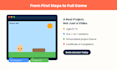
By the end of the Standard or Premium package, your child will have built a working game or interactive story from scratch (pun intended!) that they can share and show off.
Do you provide progress updates to parents?
Yes — I share brief updates after each session so you know what's been covered and how your child is progressing.


