Browse categories
Explore
Fiverr Pro
English
$
USD



Need your Elementor WordPress site fully accessible?
I help WordPress sites meet WCAG 2.2 Level A/AA, ADA, AODA, and BFSG standards, fixing accessibility issues without breaking your design. I address Elementor-specific issues to ensure your site is both compliant and functional.
What You Get: smooth screen reader & keyboard navigation, Elementor-specific accessibility fixes, optimized UX, semantic SEO improvements, and compliance that helps avoid legal penalties.
Includes: alt text & media descriptions, proper heading structure & semantic HTML, ARIA roles & labels, color contrast fixes, accessible forms & error handling, keyboard navigation, Elementor widgets (popups, sliders, containers), basic on-page SEO, manual testing with assistive tech.
How I Work: automated audits combined with detailed manual checks for real-world usability and compliance.
First-time client: Free 1-page mini audit of your homepage or key page before you order.
Note: For large, complex websites, or projects with more than 10 pages, please contact me for a custom offer. I'll put together a package designed just for your project, with clear milestones and pricing that fits your needs.
Please be aware that it is against Fiverr's policies for sellers to include themes, templates, or any other elements that infringe third-party rights or applicable laws in the delivered work. Read more about in our Guide to Responsible Digital Creation.
Certified AI Content Automation Specialist
Languages
What tools do you use to check accessibility?
I use Axe DevTools, Lighthouse, Accessibility Insights for Web, and HeadingsMap, along with screen readers (NVDA on desktop and TalkBack on mobile), plus manual keyboard navigation and focus checks. This way, your site is tested for both compliance and real-world usability.
What accessibility standards do you follow?
I follow the internationally recognized WCAG 2.1 accessibility standards, along with WAI-ARIA best practices. This means I ensure proper heading structure, clear color contrast, keyboard-friendly navigation, and screen reader compatibility.
Do you only work on Elementor websites?
Yes. I fix accessibility in Elementor WordPress sites (Free & Pro), ensuring containers, widgets, popups, and layouts meet WCAG 2.1. I fix common Elementor issues—heading hierarchy, link descriptions, keyboard navigation, color contrast, focus indicators, ARIA, and alt text.
What types of issues do you fix?
I fix all possible accessibility issues, including alt text, headings, color contrast, keyboard navigation, ARIA roles & landmarks, form labels, error handling, tab/focus order, visibility indicators, SEO-related accessibility, and code-level tweaks if needed.
Do you use accessibility plugins?
Only lightweight plugins if needed (e.g., WP Accessibility) for missing features like skip links. Core fixes—headings, alt text, keyboard navigation, ARIA roles, color contrast—are always done manually for reliability and compliance.
Do accessibility fixes improve my site’s SEO?
Yes. Accessibility overlaps with SEO: semantic headings and HTML, alt text, link clarity, labeled forms, ARIA roles, captions/transcripts, and clear content structure all help rankings. (Excludes off-page SEO like backlinks or ads.)
How do I know the work is complete?
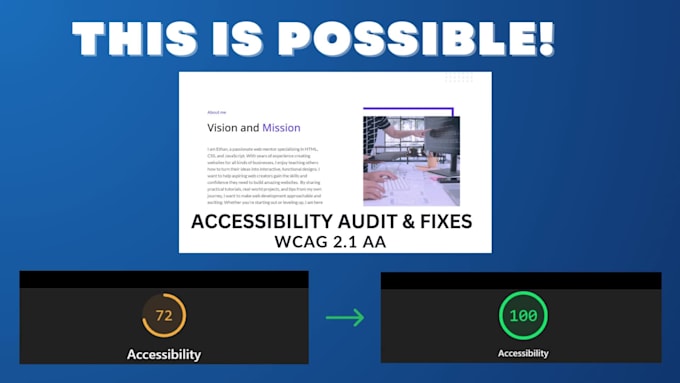
You receive a clear report summarizing all issues fixed. For tools like Lighthouse, you get a real-time link showing the final score. Additional verification includes before/after screenshots and optional manual test notes.
Will my site navigation be fully accessible?
Yes. I check menus, dropdowns, and mega menus to ensure they work via keyboard and screen readers, with logical focus order and visible indicators.
Can you fix accessibility for sliders, carousels, and galleries?
Yes. I adjust sliders, carousels, and galleries so they are fully accessible — operable via keyboard, properly labeled, and readable by screen readers — without breaking the design.
Do you handle dynamic content like AJAX-loaded sections?
Yes. I review dynamic content to ensure it’s announced properly by screen readers, focus management is correct, and keyboard navigation is maintained.