Browse categories
Explore
Fiverr Pro
English
$
USD

Level 1
1 order in queue





Gig Summary
Built your app using AI tools like Replit, Bolt, Lovable, or Cursor and now
it's stuck with bugs, crashes, or won't launch?
Most AI-generated apps work fine in preview but break the moment you try to
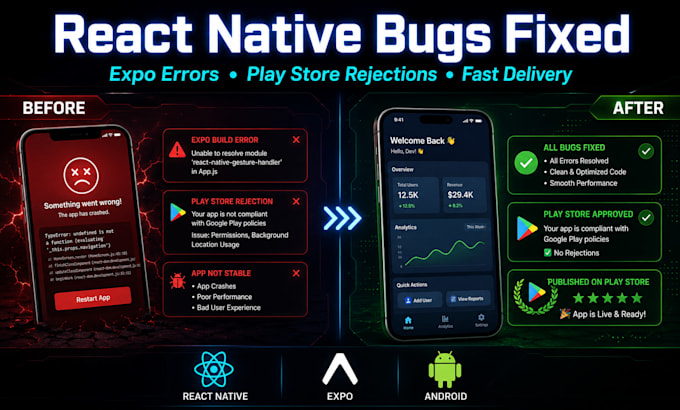
publish them. I specialize in fixing React Native & Expo apps AI-generated,
vibe-coded, or hand-coded and getting them live on the App Store / Play Store.
I Can Fix:
* App works in preview but crashes in the real build
* Expo EAS Build Failures & Errors
* App Crashes on Android / iOS
* Play Store & App Store Rejections (Permissions, Data Safety, Metadata)
* Navigation bugs (React Navigation / Expo Router)
* UI/UX glitches, white screens
* Payment integration issues (Stripe, Razorpay, RevenueCat)
* Performance issues & memory leaks
* Taking over a stuck AI-generated codebase
Tech Stack: React js, React Native (CLI & Expo), Redux, Zustand, Firebase, Supabase,
Node.js, Appwrite, Python
You don't need to understand the code. Send me your error logs, screenshots,
or project access I'll explain the issue in plain language, fix the root
cause, and get your app ready to launch.
Ready to get your app fixed and live? Message me now.
Fullstack Developer
Level 1
Languages
My app was built with AI (Replit, Bolt, Lovable, Cursor) — can you understand and fix that code?
Yes, absolutely. I regularly work with AI-generated codebases. It's still standard React Native/Expo code underneath, so I can read it, debug it, and fix it just like any other project.
I don't know how to code — can I still hire you?
Yes. Just describe your problem, or send a screenshot/screen recording of the error. I'll explain what's wrong in simple terms and handle all the technical work myself.
It works fine in Expo Go / preview but crashes in the real build (APK/TestFlight). Can you fix this?
Yes! This is the #1 issue with Expo apps. It happens because "Expo Go" doesn't support custom native code. I'll create a proper Development Build, fix missing Config Plugins, and make sure your standalone app works exactly like the preview.
I have an "EAS Build Failed" error on the cloud. Can you solve it?
Absolutely. This is usually due to version conflicts in package.json or incorrect eas.json settings. I'll debug your build logs, fix the dependency tree, and get you a green "Build Successful" result.
Do you need access to my Git repository?
Ideally, yes. I can work faster if you add me to GitHub/GitLab. If your code is highly sensitive, we can use TeamViewer/AnyDesk, or you can send me just the relevant files (like app.json and package.json).
Do I need to "eject" my Expo app to fix this bug?
No. I use Expo Prebuild and Config Plugins to fix almost any native issue without ejecting — keeping your project clean and easy to update.
My launch/investor demo is close — how fast can you fix this?
Most bugs are fixed within 24-48 hours depending on complexity. If it's urgent, message me first and I'll prioritize your project.
| (9) | ||
| (0) | ||
| (0) | ||
| (0) | ||
| (0) |
natsback

United States
Abdullah delivered an extremely thorough and honest code audit. He didn't just check the 4 issues I asked about — he actually tried to build and run the app, and in doing so caught a deeper dependency conflict that would have blocked any future fixes from working. He explained everything clearly for...
$50-$100
Price
2 days
Duration

Seller's Response
natsback
United States
"Abdullah did an exceptional job diagnosing and fixing a build issue that had the app completely unable to compile. He correctly identified a version conflict between a subscription package and the project's Android build tools, and also caught a known Expo/pnpm autolinking bug along the way — fixing...
$50-$100
Price
4 days
Duration
Seller's Response

etinan1

United Kingdom
Trustworthy and Professional
$50-$100
Price
6 days
Duration
etinan1
United Kingdom
a Good listener
$50-$100
Price
2 days
Duration
Seller's Response
leylaujala

Netherlands
I had multiple issues in my React Native e-commerce app. The cart was not updating properly, product filters were broken, checkout page had problems, and Stripe integration was failing completely. Abdullah quickly checked everything, fixed all the bugs, and resolved the integration issue perfectly....
$50
Price
5 days
Duration

Seller's Response
| (9) | ||
| (0) | ||
| (0) | ||
| (0) | ||
| (0) |
natsback
United States
Abdullah delivered an extremely thorough and honest code audit. He didn't just check the 4 issues I asked about — he actually tried to build and run the app, and in doing so caught a deeper dependency conflict that would have blocked any future fixes from working. He explained everything clearly for...
$50-$100
Price
2 days
Duration
Seller's Response
natsback
United States
"Abdullah did an exceptional job diagnosing and fixing a build issue that had the app completely unable to compile. He correctly identified a version conflict between a subscription package and the project's Android build tools, and also caught a known Expo/pnpm autolinking bug along the way — fixing...
$50-$100
Price
4 days
Duration
Seller's Response
etinan1
United Kingdom
Trustworthy and Professional
$50-$100
Price
6 days
Duration
etinan1
United Kingdom
a Good listener
$50-$100
Price
2 days
Duration
Seller's Response
leylaujala
Netherlands
I had multiple issues in my React Native e-commerce app. The cart was not updating properly, product filters were broken, checkout page had problems, and Stripe integration was failing completely. Abdullah quickly checked everything, fixed all the bugs, and resolved the integration issue perfectly....
$50
Price
5 days
Duration
Seller's Response