Browse categories
Explore
Fiverr Pro
English
$
USD

Level 1


Still moving files, copying data, and forwarding emails by hand?
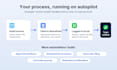
I build Microsoft Power Automate flows that connect SharePoint, Excel, and Outlook so the boring work runs itself. I'm a Microsoft Certified Power Platform developer with 30+ five-star reviews, and Microsoft 365 automation is my daily work.
Automations I build:
How it works:
Real example: for one client I built an Outlook flow that automatically archives emails into 15 organized OneDrive folders on a weekly schedule, with duplicate detection and an Excel tracker hours of weekly filing reduced to zero.
Message me before ordering so I can confirm the right package for you.
Microsoft Certified Software Engineer, Power Platform Developer
Level 1
Languages
What access do you need?
Often none: I can build in my own environment and guide you to recreate it, or we do a live session. If you add me to your tenant, your data never leaves it.
Can you automate a process that uses all three (SharePoint + Excel + Outlook)?
Yes, that's the Premium package and honestly my favorite kind of project.
Will the flow break later?
I add error handling and failure notifications so if anything ever fails (e.g. an expired connection), you know immediately. I also offer post-delivery support.
Do I need a paid Power Automate license?
Most SharePoint/Excel/Outlook automations work with the license already included in Microsoft 365 business plans. I'll confirm before we start.
Can you fix an existing flow instead?
Yes, check my flow-fixing gig, or message me.