Browse categories
Explore
Fiverr Pro
English
$
USD
Certified Project Management Professional MS Project and Advanced Excel Expert
Level 1
Has met certain performance criteria and shows strong potential in the marketplace.
Highly Responsive
Known for exceptionally quick replies
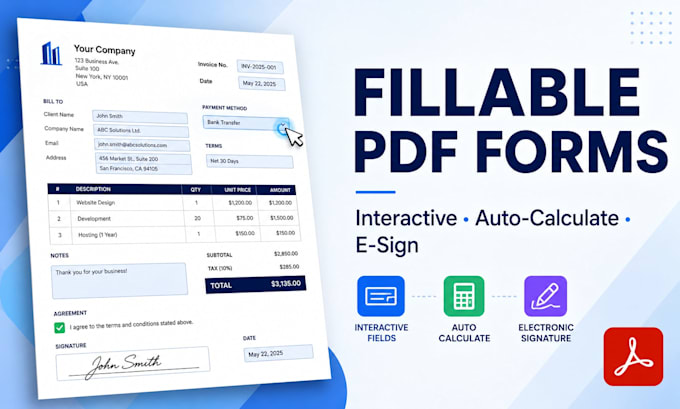
Need a PDF that people can actually FILL, not print and scan?
I create professional, interactive fillable PDF forms in Adobe Acrobat Pro
forms that work on any device, calculate totals automatically, and look exactly
like your original design.
WHAT MAKES MY FORMS DIFFERENT
Most sellers just add empty boxes. I build forms that think:
WHAT I CAN CONVERT
Word (.docx) · Excel · Scanned paper form (image/JPG) · Existing PDF ·
Canva design · Google Docs · Hand-drawn sketch I'll rebuild it clean.
PERFECT FOR
Invoices · Quotations · Job applications · Medical intake forms ·
Real estate contracts · Registration forms · Employee onboarding ·
Tax worksheets · Client questionnaires · Order forms
Not sure which package fits? Message me first I'll tell you honestly,
even if it means a smaller order.



Convert from:
DOC, DOCX
Convert to:
Will the form work on phones and Mac?
Yes. My forms are built to the standard PDF spec, so they open and fill correctly in Adobe Reader, Preview on Mac, Chrome, and most mobile PDF apps.
What file do I need to send you?
Anything — Word, Excel, a photo of a paper form, a Canva design, or an existing PDF. If it's a low-quality scan, I'll rebuild it cleanly.
Can the form add up numbers by itself?
Yes, that's my specialty. Subtotals, tax, discounts, grand totals — I set up the formulas so the buyer just types and the math happens.
Can people sign the form digitally?
Yes, I add a proper signature field (included in Standard and Premium). Buyers can sign with a saved signature or draw one.
What if I don't like the result?
I'll revise it until it's right. I'd rather do three revisions than deliver something you won't use.
Do you keep my documents?
No. I delete client files after delivery, and I'm happy to sign an NDA on request.