Browse categories
Explore
Fiverr Pro
English
$
USD


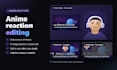
Watching anime is the fun part. Cutting the reaction is not. Send me your facecam recording and the episode you watched, and you get back a finished reaction video that is ready to upload.
Every package includes:
Packages go by episodes: 1, 2 or 3, with up to 30 minutes of raw footage each (a 24-minute episode plus your pauses).
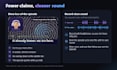
Worried about claims? I can show less of the episode: cut to you more often, use a smaller, dimmer window, lay an overlay of your own image over it down to the subtitle line, and turn it down while you talk. This lowers the odds; nobody can promise no claims.
Best sound: record with headphones so your mic hears only you, and send the episode as its own file.
I edit with ReactionCut, a reaction-specific editor. You must have the right to use the footage you send.
Reaction video editor for anime, movie and TV show channels
Languages
What files do you need, and how should I record?
Two separate files: your camera recording with your microphone, and the episode file with its own sound. Record with headphones on, so your mic hears only you. Your voice stays clean and the cuts follow you, not the episode.
Do I need to sync the files myself?
No. I line up your camera and the episode to the frame. A clap at the start of your recording makes it even quicker.
Can you keep the subtitles readable?
Yes, that is the point of this gig. Your camera goes where the subtitles are not, and while you talk the episode can shrink to just the subtitle line.
Will my video get a copyright claim?
Nobody can guarantee it won't. I can lower the odds: cut to you more often, a smaller and dimmer window, an overlay of your own image down to the subtitle line, and the episode turned down while you talk.
What resolution do I get?
The resolution of your recordings, up to 4K, as a clean MP4 with no watermark.
Can I keep editing the video myself?
Yes, with the Source file extra. You get the cut as an EDL or FCPXML timeline that opens in DaVinci Resolve, Premiere Pro or Final Cut with your own files.
Which layouts can I choose?
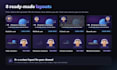
Any layout: one of the 8 ready-made ones in the gallery, a custom one for your channel, or a mix, for example the episode full screen while you watch and you full screen with a subtitle strip while you talk.
How long can my recording be?
Each package counts up to 30 minutes of raw footage per episode. That fits a 24-minute episode plus your pauses and comments. If you paused a lot, pick the next package up.


