Browse categories
English
$
USD
Connect to your AI
Do you clean the same CSV export every week or month? I will build a refreshable Excel workbook that imports your exports and applies the same cleanup rules each time.
Basic: 1 CSV layout and file, up to 5,000 rows, with a clean table.
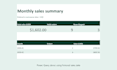
Standard: 1 layout, up to 12 files and 30,000 total rows, with a monthly summary and exceptions tab.
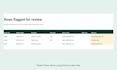
Premium: 2 layouts, up to 12 files and 50,000 total rows, joined on one agreed key, with up to 5 KPIs, 3 charts and an exceptions tab.
Send a sample export and tell me what your finished report should show. I can standardize dates and amounts, remove duplicates using agreed rules and flag rows for review.
You'll receive an editable .xlsx file with source path and refresh instructions. The workbook uses Microsoft 365 Excel desktop on Windows. Run Data > Refresh All to update it. Please message me before ordering if your exports vary or you need SharePoint, APIs, VBA or scheduled refresh.
Revisions cover adjustments to agreed rules or presentation. New layouts, sources and requirements are quoted separately.

Technology:
Excel
Expertise:
Data manipulation
•
Data validation
•
ETL
•
Transformation
How do I update the report?
Replace your source CSV or add new CSVs to the agreed folder, depending on your package. Open the workbook in Excel desktop on Windows and select Data > Refresh All.
What happens if a row cannot be parsed?
We agree which rows to flag before I build the report. Standard and Premium include a separate exceptions tab for those rows.
Can the export contain a different set of columns each month?
The refresh expects the agreed column names and structure. Please send representative examples if your export format varies.
Can I send anonymized data?
Yes. Keep the column names, formats and representative edge cases so the workbook can be tested.


