Browse categories
Explore
Fiverr Pro
English
$
USD
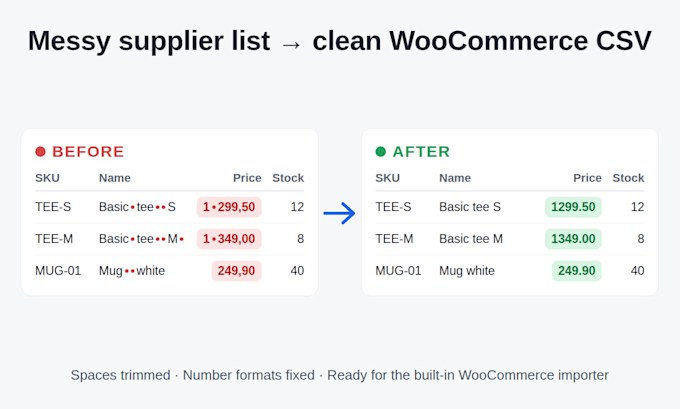
I will turn your supplier price list (CSV or Excel) into a clean CSV for the built-in WooCommerce importer.
What I do:
- Map supplier columns to WooCommerce columns (SKU, name, price, stock...); headers in 12 languages
- Clean values: trim spaces, fix number formats like 1 299,50 to 1299.50
- Build variable products with variations from flat rows (Standard and Premium)
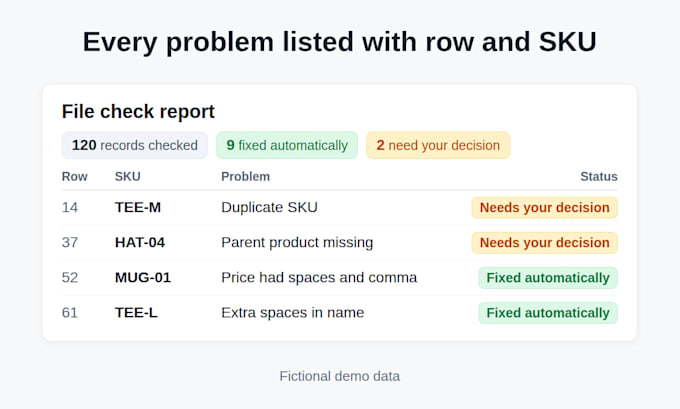
- Check the file and report every problem I can't fix automatically
- Split big catalogs into import batches of up to 500 records (Standard and Premium)
- Make price and stock update files by SKU from your store export (Premium)
- Extract pictures placed in Excel into a ZIP with a SKU manifest (Premium)
Catalog size: Basic up to 1,000 products, Standard up to 5,000, Premium up to 50,000. Bigger file? Message me first.
I check every file with my own verification tool before delivery. Send me 10-20 sample rows before ordering to confirm fit!


Technology:
Excel
•
Other
Industry:
Retail & wholesale
Data type:
Numeric
•
String
•
Currency
Do you need access to my WooCommerce store?
No. I only work with your supplier file (and a product export for price updates). You import the result yourself.
Which file formats do you accept?
CSV (UTF-8, comma or semicolon) and Excel (.xlsx, .xlsm). Old .xls and Windows-1251 files: please re-save as .xlsx or UTF-8 CSV first.
What if my file has problems you can't fix automatically?
I list each one with its row and SKU in a report. Missing parents or duplicate SKUs need your decision, I never guess.
Will the import definitely work in my store?
I check the file against the built-in importer rules, but I can't test your hosting or plugins. Always test on a staging copy first.
What do you need for price and stock updates (Premium)?
Your supplier price list plus a fresh product export from your WooCommerce store. I match products by SKU and give you files that change only regular price, sale price and stock. Nothing is created or deleted.
Will Excel pictures appear in my store automatically?
No. You get a ZIP with the pictures and a manifest linking them to SKUs. You upload them to your media library or image hosting and fill the Images column. Pictures set as "Place in Cell" or made by the IMAGE() formula can't be extracted.