Browse categories
Explore
Fiverr Pro
English
$
USD

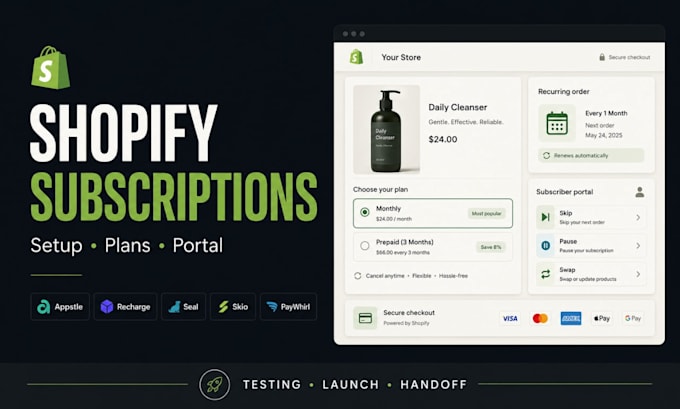
Your Shopify subscription system should collect recurring orders, show clear plan choices, and let customers manage changes without support tickets.
Most stores do not fail because the app is missing. They fail because selling plans, widget placement, portal permissions, emails, and checkout behavior are never tested together.
Your setup can include:
Behind the scenes, I test the product page, plan selector, cart, checkout, account portal, and subscriber controls. You receive a Subscription Launch Audit showing what was configured, tested, and left for your team.
App fees are yours and features depend on your chosen plan. Send your store URL and preferred app. Confirm the scope, then place your order.
Please be aware that it is against Fiverr's policies for sellers to include themes, templates, or any other elements that infringe third-party rights or applicable laws in the delivered work. Read more about in our Guide to Responsible Digital Creation.
Designing with Strategy
Languages
What does an Appstle subscription setup include?
Your Appstle setup can include selling plans, eligible products, widget placement, discounts, Build-a-Box options, portal settings, and a checkout test. The agreed scope is listed before work starts, so no key launch step is assumed or missed.
Can customers manage Recharge subscriptions themselves?
Your Recharge customer portal can let subscribers skip, pause, swap, cancel, update payment details, or change delivery timing where your plan allows it. Portal permissions are tested before handoff, so customers see only the controls you approve.
How long does Seal Subscription setup take?
Your Seal Subscription setup takes 3 to 7 days after access, products, billing rules, and theme details are confirmed. A working draft is tested across product, cart, checkout, and account areas before delivery, preventing a rushed launch.
