Browse categories
Explore
Fiverr Pro
English
$
USD

Level 2
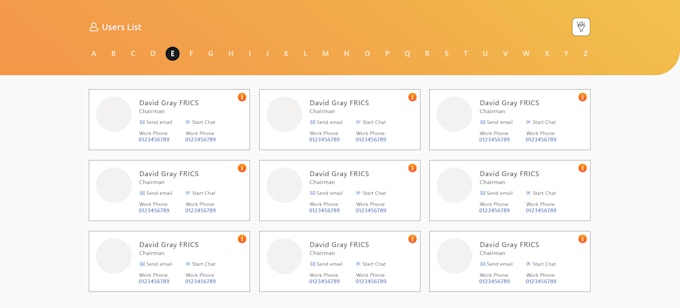

The Employee Directory is a centralized and searchable directory designed to provide quick access to employee information across the organization. Built within SharePoint, this custom solution allows users to easily search, filter, and view profiles of colleagues by name, department, job title, or location.
The directory pulls data from a Azure and presents it in a modern, user-friendly layout featuring profile pictures, contact details, and organizational information. This tool enhances internal collaboration, improves communication, and supports a connected workplace.
This custom-built directory helps foster teamwork, improves communication, and makes it simple to reach the right person at the right time.
Please be aware that it is against Fiverr's policies for sellers to include themes, templates, or any other elements that infringe third-party rights or applicable laws in the delivered work. Read more about in our Guide to Responsible Digital Creation.
SharePoint Intranet, SPFx Specialist with 11 Years of Experience
Level 2
Languages
What is the Employee Directory?
The Employee Directory is a custom-built solution in SharePoint that allows employees to easily search, view, and connect with colleagues across the organization.
Where does the employee information come from?
Employee details are pulled directly from Microsoft 365 (Azure Active Directory), depending on the setup. Profile data such as name, job title, department, and contact details are maintained by the HR or IT team.
How do I search for an employee?
Use the search bar at the top of the directory to search by: Employee Name Department Job Title Location Any keyword related to their profile
How often is the directory updated?
The directory updates automatically if connected to Microsoft 365.
Can I view the directory on my mobile device?
Yes! The Employee Directory is built using responsive design and can be accessed from mobile devices through SharePoint Online or the Microsoft Teams app if integrated.
Who can access the Employee Directory?
By default, the directory is available to all employees with access to the SharePoint site. Specific access restrictions can be applied if required.
Can we customize the directory further?
Yes! The Employee Directory is fully customizable. Features like advanced filters, profile pictures, department-wise views, and additional fields can be added based on business requirements.
