Browse categories
English
$
USD
Connect to your AI
Python Data Automation, Web Scraping, Excel Cleaning and Dashboards
Need clean, structured data pulled from a public REST API or product catalog without broken columns or scripts that crash midway?
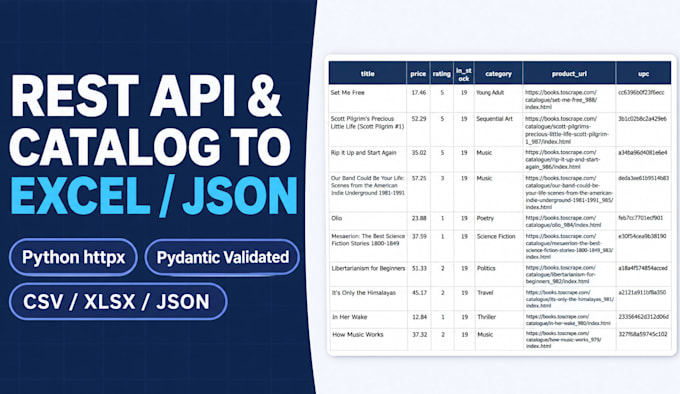
I build reliable Python pipelines (httpx, lxml, Pydantic v2) that turn paginated REST APIs and static websites into ready-to-use Excel, CSV, and JSON files.
What you get:
- API & HTML extraction: Multi-page JSON endpoints and static product catalogs.
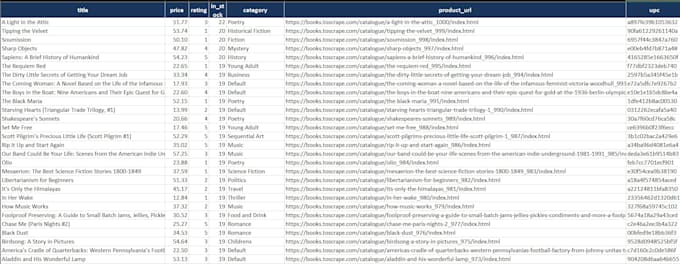
- Strict validation: Prices parsed as real numbers, ratings and stock normalized, duplicates removed, and malformed rows logged to rejected_rows.log.
- Formatted Excel output: Styled headers, frozen top row, auto-fitted column widths, and numeric cells.
- Built-in resilience: Polite rate limiting, automatic retries with exponential backoff, robots.txt checks, and disk caching/checkpoints to resume runs.
- Reusable Python code (Standard/Premium): Clean CLI script with clear setup instructions.
Please note: Public REST APIs and static HTML sites only (robots.txt compliant). No personal data, login/paywall bypass, CAPTCHAs, or Cloudflare bypass.
Message me your target URL or API docs and required fields before ordering to confirm compatibility.


Technology:
Python
•
Excel
•
Beautiful soup
•
Pandas
Technique:
Automated
Can you scrape sites behind logins, paywalls, CAPTCHAs, or Cloudflare?
No. I only build compliant extractors for public REST APIs and publicly accessible static HTML sites while respecting robots.txt. Message me the URL first and I will confirm quickly.
What about JavaScript-heavy sites built in React or Vue?
This gig covers fast static HTML parsing and public REST API extraction. If a site loads data from an open JSON API in the background, I can often pull directly from that endpoint, so send me the link to check.
Do I get the Python script to run again later?
Basic delivers the cleaned dataset files. Standard and Premium include the documented Python CLI script so you can re-run extractions locally anytime.
What happens if a few records have broken or missing fields?
Valid rows export cleanly while any malformed or unparseable records are written to a separate rejected_rows.log file with error details instead of crashing the run.