Browse categories
English
$
USD
Connect to your AI
Python Excel and CSV automation, Dutch and English SEO content
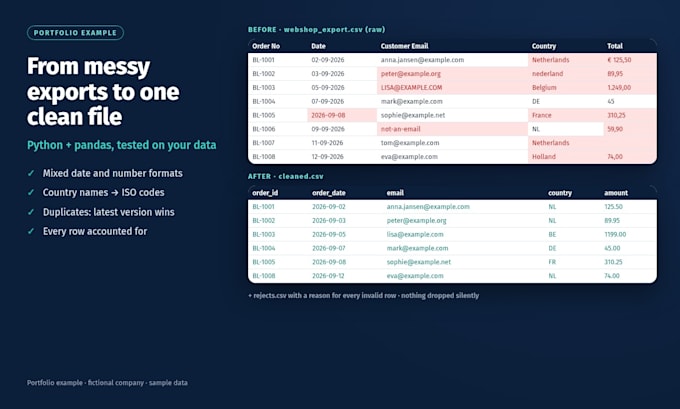
Exports that never line up? Duplicates after a merge, broken characters, dates in three formats? I write a Python script that cleans and merges your Excel and CSV files, and that you can run again yourself next time.
What you get:
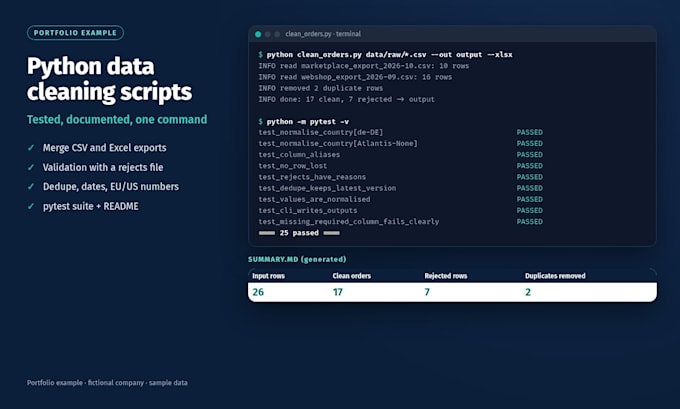
- the source code
- a README explaining how to run it
- a test run on your sample file, shown to you before delivery
- checks such as row counts before and after, so a bad merge doesn't pass silently
Standard and Premium only: a rejects file with every row that was set aside and the reason. -Basic doesn't include this.
Basic covers up to 2 input files. Standard and Premium add validation, pytest tests and a log file.
Please message me first with a sample file. Anonymised or dummy rows with the same columns are fine. That way I can check the scope before you order.
Not included: scraping sites that don't allow it, bypassing logins, hosting.
AI may help with drafts or code review; I test the script on your sample and stay responsible for what I deliver.


Technology:
Excel
•
Python
What counts as "1 task" in Basic?
One job from input to output, like "merge these 2 exports and remove duplicates" or "turn this XLSX into a clean CSV". If your request is really 2 or 3 jobs, I'll tell you which package fits before you order.
Which files and sizes can you handle?
CSV, XLSX/XLS, JSON and most text exports. Files up to about a million rows usually run fine on a normal laptop. Bigger? Tell me the size and I'll confirm first.
Will it run on my computer?
Yes, on Windows, macOS or Linux with Python 3.10 or newer. The README has step-by-step setup. Premium can also run in Docker.
What does "scheduled run" mean in Premium?
I send step-by-step setup for your machine or server (Windows Task Scheduler or cron), or a Docker container, and we test one run together. I don't log into your machine or host it for you.
What if my export changes later?
The script runs again as long as the columns stay the same. Bugs in what we agreed are fixed free within your revisions. After the order is complete, new columns, files or rules are a small new order or a custom offer.
Is my Excel or CSV data safe with you?
You can send anonymized sample rows with the same columns and formats as your real files. I build and test the script on those, and you run it on your real data yourself.
Do you do manual Excel data cleaning?
No. This gig is a reusable Python script. If you need one file cleaned once by hand, a manual cleanup service is likely cheaper. A script pays off when the same cleanup repeats.
Do I need to know Python to use the script?
No. You only need Python installed to run it, and the instructions show the exact command. Ask before ordering if you are unsure about your setup.
Can you merge multiple Excel or CSV files into one?
Yes. The script can combine Excel and CSV files into one clean output and match rows on a key column. Basic covers one task with up to two input files. Send your files and I will confirm the package.
Is the rejects file included in Basic?
No. Basic includes the script, a README with setup steps, and a test run on your sample file, shown before delivery. A rejects file with a reason per row is only in Standard and Premium.