Browse categories
Explore
Fiverr Pro
English
$
USD



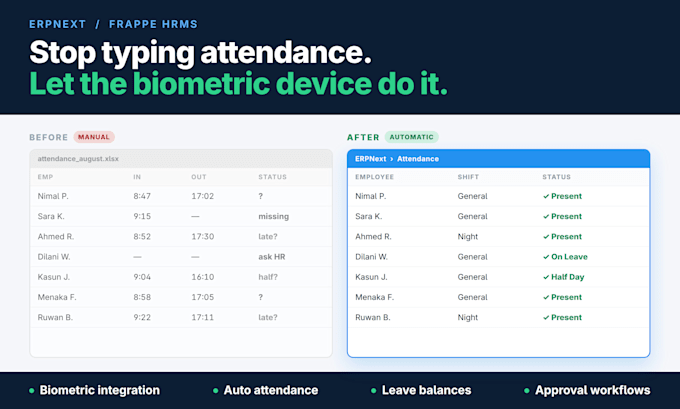
Your ERPNext HR module is installed but attendance is still being typed in by hand? I fix exactly that.
I am an ERPNext/Frappe developer who has run HR, attendance and payroll on live production instances for a university and for private clients. HR is not a side skill for me it is what I do.
WHAT I SET UP FOR YOU
* Biometric device integration (ZKTeco, eSSL and others) pulling checkins into ERPNext automatically
* Auto attendance marking on a schedule shift types, grace periods, late entry, early exit, half-day rules
* Leave types, allocation and accurate leave balances employees can see themselves
* Approval workflows leave, attendance regularisation, shift requests with roles, states and email alerts
* Employee self-service + role permissions so managers only see their own team
* HR reports that match how your company actually counts a working day
WHY ME
* Production experience, not tutorial experience
* I test with your real employee data before handover
* Clear handover video so your HR team can run it without me
Message me with your ERPNext version and biometric device model and I will tell you in one reply whether it can be integrated.
Tech Enthusiast
Languages
Do I need to already have ERPNext installed?
Not necessarily. If you have a running instance I work on it directly. If you don't, add the "Server installation" extra and I will install ERPNext + HRMS on your server or a cloud VPS first, then do the HR setup on top
Which biometric devices do you support?
Any ZKTeco or eSSL device that supports the pull API, plus most devices that can export checkin logs as CSV. Send me your model number before ordering and I will confirm in one reply — no guessing after you pay.
Will attendance be marked automatically or do I click a button?
Automatically. I set up a scheduled job that imports checkins from the device and marks attendance against your shift rules — including late entry, early exit and half-day. Your HR team only reviews exceptions.
Can employees see their own leave balance?
Yes. Leave types, allocations and balances are configured so each employee sees their remaining leave in their own portal, and applies for leave there. Managers approve from the same screen or by email.
Can you build multi-level approval chains?
Yes — that is in the Premium package. For example: leave request → team lead → HR manager → approved, with different states, role permissions and email notifications at each step.
Do you work on Frappe HRMS v15/v16?
Yes. I work across v14, v15 and v16. HRMS is a separate app from ERPNext in newer versions — I handle installing and configuring it either way.
What if my company's attendance rules are unusual?
That is normal and it is the part I am good at. Two lates equal a half day, shift-wise OT, weekend rules — these usually need a small custom script or DocType, which I write. Describe your rule before ordering.
Will you migrate our existing attendance history?
I can import historical checkin or attendance data from Excel/CSV as part of Standard and Premium. Send a sample file first so I can check the format.
Do you provide support after delivery?
Premium includes 14 days of post-delivery support for anything related to the setup. You can also add 30 days priority support as a gig extra.