Browse categories
Explore
Fiverr Pro
English
$
USD



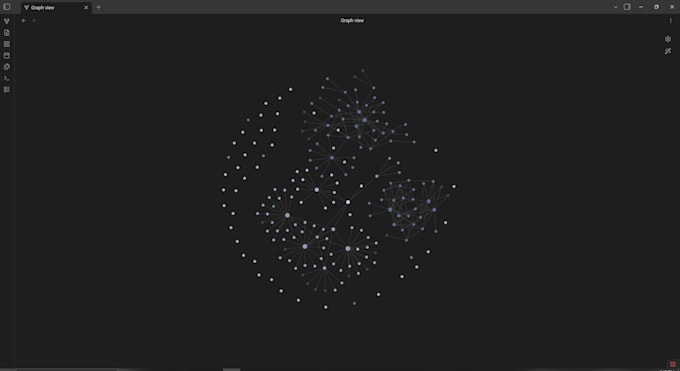
I'll set up an Obsidian vault that's actually ready to use on day one clean folder structure, working templates, plugins pre-configured, and an auto-linked graph view. No "figure it out yourself" guides.
(all tiers):
Pre-built folder structure
Daily Note + Note scaffold templates (working, not "examples")
Auto-linked graph view (every note connects to its hub automatically)
Setup guide (START HERE.md) walking you through your first 10 minutes
Plugin install screenshots no prior Obsidian experience needed
TIERS:
BASIC ($25) Starter Vault
Pre-built folders, Daily Note + scaffold templates, auto-linked graph hub, setup guide. 0 setup steps. 1-day delivery.
STANDARD ($55) Working Vault
Everything in Basic + custom folders for how YOU work, 6 templates including Meeting/Project/Person/Book, colour-coded graph clusters by type. 5-day delivery.
PREMIUM ($110) Pro Second Brain
Everything in Standard + PARA structure, live Dashboard with 5 Dataview queries, recurring task system, 8+ templates, folder-as-node graph, 10-min Loom walkthrough. 7-day delivery.
Second brain systems and workflow automation for busy freelancers
Languages
I've never used Obsidian before. Is this still for me?
Yes — especially the Basic tier. The vault is pre-configured so you open it and it works. The included START HERE.md walks you through your first 10 minutes, and plugin install steps come with screenshots. If you can install Chrome, you can install Obsidian.
Will this work on Mac / Windows / Linux / mobile?
Obsidian itself runs on all of them. The vault I deliver is just files in a folder, so it works on any OS Obsidian supports. Mobile sync (Obsidian Sync, iCloud, Syncthing) is available as a $15 add-on for Standard and Premium tiers.
What plugins do I need to install? Are they free?
All plugins are free community plugins. Basic uses Templater + Calendar (2 plugins). Standard adds Dataview (3 total). Premium adds Folder Notes (4 total). Install steps are walked through in your setup guide with screenshots.
Can you customise the vault for my specific use case?
Standard and Premium tiers include customisation — you'll fill out a short intake (5–8 questions) after ordering, and I'll tailor folder names, templates, and graph clusters around your actual workflow. Basic is a clean blank-slate vault, same for everyone.
What if I want to upgrade later?
Send me a message — upgrading from Basic to Standard or Standard to Premium is just the price difference + a new delivery cycle. Your existing notes carry over.
What's your refund / cancellation policy?
Before I start work: full refund, no questions — just message me. After delivery: you get the revision rounds for your tier (Basic 1 / Standard 2 / Premium 9) to make sure it matches the gig spec. If I built something that doesn't match the spec, I fix it free.