Browse categories
Explore
Fiverr Pro
English
$
USD
Clean Audio Routing for Serious Content Creators
Poor audio quality, incorrect Rodecaster settings, and messy audio routing can make streams, podcasts, and recordings sound unprofessional. Bad sound can reduce engagement and affect content quality.
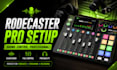
Get a professional Rodecaster Pro setup optimized for streaming, podcasts, voice recording, gaming, OBS Studio, and Streamlabs. Perfect for creators who want clean sound, smooth audio routing, and professional audio performance.
What You Get
Perfect for streamers, podcasters, gamers, and content creators looking for premium sound quality and smooth audio performance.
Message now to get your Rodecaster setup running professionally.
CONTACT BEFORE ORDERING

Software:
OBS Studio
Platform:
•
Twitch
•
YouTube
•
Mixer
Purpose:
Gaming
•
Music
•
Lifestyle
•
Business
•
News
•
Streamshare
•
Webinar
What do you need to start my Rodecaster setup?
Please provide your Rodecaster model, microphone details, streaming or podcast software, and explain your audio goals or current issues. This helps create the best audio configuration for your setup.
Can you setup Rodecaster Pro for streaming and podcasts?
Yes. Rodecaster setups are optimized for streaming, podcasts, gaming, voice recording, OBS Studio, Streamlabs, and professional audio routing.
Will this improve my audio quality?
Absolutely. Your setup will be optimized for cleaner sound, balanced microphone levels, reduced background noise, and smoother audio performance for a more professional listening experience.
Do you fix audio routing or sound issues?
Yes. Common problems like echo, low microphone volume, distorted sound, routing errors, OBS audio issues, and Streamlabs sound problems can all be professionally fixed.
How long does the setup take?
Most Rodecaster setups are completed within a few hours depending on complexity. Advanced audio routing or multi-device configurations may require additional optimization time.
Do you provide support after delivery?
Yes. Support is available after delivery to help ensure your setup runs smoothly. Additional optimization, streaming setup, and podcast configuration services are also available if needed.
Can beginners order this service?
Yes. The service is beginner friendly and everything is configured clearly for easy use, whether you are starting a podcast, streaming setup, or professional recording workflow.
