Browse categories
Explore
Fiverr Pro
English
$
USD


A product video that shows every angle and every detail, without a camera crew.
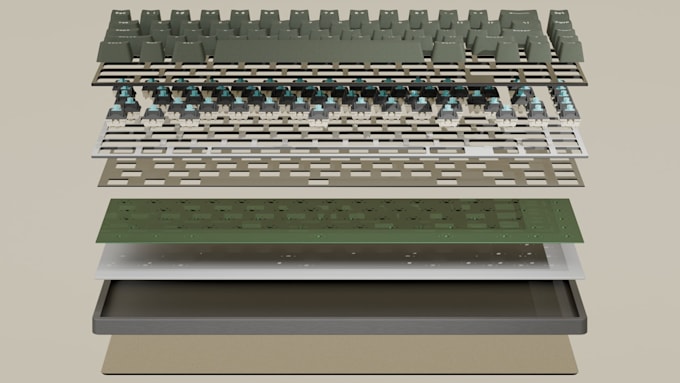
I create 3D product animation videos in Blender. Smooth turntable spins, exploded view breakdowns where every component separates to show how the product works, or a combination of both. Rendered in Blender Cycles.
The sequence is directed around your product specifically. Which part reveals first, where the camera holds, what the lighting emphasises. That is the difference between a spinning object and a video that explains why your product is worth buying.
What I deliver:
- Turntable rotation, 360 showing all angles
- Exploded view, parts separating to show construction
- Combined turntable and exploded sequence
- 1080p or 4K, MP4, ready for ads, listings, or your site
- Transparent background version available
How I work:
- Scene and camera layout sent for approval before I animate
- Preview render at mid-stage so you can redirect early
- Near-final sent before the full render, so nothing is a surprise
- I reply to messages within the hour
Works for product launches, crowdfunding, Amazon listings, social ads, and pitch decks.
Message me with your product details before ordering.
Blender 3D Artist Product Renders, Animation Videos, Print Models and Figurine
Languages
Do you need a 3D model of my product?
asic assumes you have a usable 3D file such as STL, OBJ, or GLTF. Standard and Premium include modelling from reference photos. If you are on Basic and have no 3D file, add the modelling extra or message me first and I will point you to the right package.
What format is the final video?
MP4 delivered in the order. Transparent background with alpha channel available if you need to composite it over other footage.
Can I use this commercially?
Yes. All packages include full commercial rights for advertising, social media, and ecommerce.
How much input do I get during the build?`
You approve the camera and scene layout before I animate, see a preview at mid-stage, and see a near-final before the full render. Three points to redirect rather than one at the end.