Browse categories
Explore
Fiverr Pro
English
$
USD

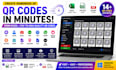


Need to generate hundreds of QR codes in minutes? I will deliver a professional Windows desktop application that converts your Excel or CSV data into high-quality, scannable QR codes with batch export, logo embedding, PDF generation, and print-ready label sheets.
WHAT YOU GET (Fully functional desktop software):
- Bulk QR code generation from Excel (.xlsx/.xls) or CSV files
- 14 QR types supported: URL, vCard, Email, SMS, WiFi, Phone, Social Media, Bitcoin, Event, Text & more
- Custom logo insertion at the center of every QR code
- Multi-page PDF export with configurable grid layout
- Print-ready label sheets with borders, text labels, and QR codes
- Preview grid showing up to 50 generated QR codes at once
- One-click export to PDF or label sheet PNG
- Full-featured GUI with CustomTkinter modern design
WHO NEEDS THIS:
- Warehouse managers labeling inventory with unique QR codes
- Schools creating student ID or asset tracking QR codes
- Shop owners generating product QR codes for catalogs
- Event organizers creating batch QR tickets
- Marketing agencies generating bulk campaign QR codes
WHY CHOOSE THIS:
100% unique QR codes per data entry
Lifetime validity codes never expire
I build Windows desktop software that works
Languages
What types of QR codes can I generate?
The software supports 14 QR types: URL/Website, Text, Email, SMS, Phone, WiFi, VCard, Address, Facebook, Twitter, YouTube, Event, Bitcoin, and Any Text. Each type formats the data correctly for maximum scanner compatibility.
Can I add my company logo to the QR codes?
Yes! You can select any PNG or JPG image as a logo. The software automatically places it at the center of every generated QR code while maintaining scannability.
What file formats can I import data from?
You can import data from Microsoft Excel (.xlsx, .xls) and CSV files. Simply put your data in the first column, each row becomes one QR code.
Can I export the QR codes as PDF or print them?
Yes, two export options are available: - PDF Export: Generates multi-page PDF with QR codes arranged in a grid - Label Sheet: Creates print-ready PNG with borders, QR codes, and text labels
Is this a one-time purchase or subscription?
One time purchase. You receive a lifetime license key valid for one PC. No monthly fees, no hidden charges.
Does the software work offline?
Yes, the software runs completely offline on your Windows PC. No internet connection required after activation.
Can I customize the QR code size and colors?
The software offers configurable QR size (Small to X-Large) and label grid settings (columns and rows per page). Color customization is available on request.
What if I need a license for multiple computers?
Each license is valid for one PC. Contact me for bulk/multi-device licensing options.
Do you provide the source code?
No, source code is not included. You receive a compiled Windows executable (.exe) with full functionality.
What if I face issues after purchasing?
I provide full after-sales support. Contact me on Fiverr and I will resolve any issues within 24 hours.